• Required reading for all forum users!!!

    Welcome!
    Register to access the full functionality of the GSResources forum. Until you register and activate your account you will not have full forum access, nor will you be able to post or reply to messages.

    A note to new registrants...
    All new forum registrations must be activated via email before you have full access to the forum.

    A Special Note about Email accounts!
    DO NOT SIGN UP USING hotmail, outlook, gmx, sbcglobal, att, bellsouth or email.com. They delete our forum signup emails.

    A note to old forum members...
    I receive numerous requests from people who can no longer log in because their accounts were deleted. As mentioned in the forum FAQ, user accounts are deleted if you haven't logged in for the past 6 months. If you can't log in, then create a new forum account. If you don't get an error message, then check your email account for an activation message. If you get a message stating that the email address is already in use, then your account still exists so follow the instructions in the forum FAQ for resetting your password.

    Have you forgotten your password or have a new email address? Then read the forum FAQ for details on how to reset it.

    Any email requests for "can't log in anymore" problems or "lost my password" problems will be deleted. Read the forum FAQ and follow the instructions there - that's what we have one for...

  • Returning Visitors

    If you are a returning visitor who never received your confirmation email, then odds are your email provider is blockinig emails from our server. The only thing that can be done to get around this is you will have to try creating another forum account using an email address from another domain.

    If you are a returning visitor to the forum and can't log in using your old forum name and password but used to be able to then chances are your account is deleted. Purges of the databases are done regularly. You will have to create a new forum account and you should be all set.

Pilot Box / Indicator Lights Cover Lettering

dgates1

Forum Mentor
Super Site Supporter
Past Site Supporter
Anybody have any tips on how to "refresh" the white lettering on the Pilot Box cover?? Oil, Turn, Neutral, and High Beam are pretty faded and not very visible on mine.

Was thinking something like filling in the letters on a pistol slide, but they don't seem to be very deep in the plastic.

I've searched the previous threads with limited results. Cover is just like the one below, but most of the lettering is gone.
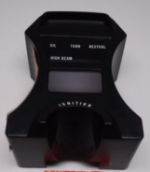
image.png

Just wondering if anyone else has ever tried to make the letters nice and clean again and what process they may have used. Any help in the right direction would be appreciated! ​
 
I got this idea from Chuck Hahn IIRC. This works if the letters are raised. Use enamel white Testor's model paint. The kind we used to use to paint plastic models. Shake well, put some in the paint bottle lid. Use a pencil with a new good rubber eraser. Dab the eraser in the paint. Then dab the letters. Takes some practice. Make sure you have some thinner and q-tips for clean up. See If I can find a pic.

The lettering on my Glock slide are engraved/recessed and I use a wax crayon to color those in, then wipe to remove the excess.
I've been afraid to try that on the TURN and NEUTRAL words on the plexi of the instrument panel for fear of scratching it worse than it is.

Before:
alnU6i8l.jpg

3W2Ghell.jpg


After:
6AQyKawl.jpg
 
Last edited:
Thanks Rich. I am trying to get the ones on the clear plastic part looking a little better.

I did the slide on my Taurus G2c with thinned out Testor's model paint and wiping off the excess with some Hoppe's oil. That worked awesome and turned out beautiful.
 
I’ll have to try the testor’s on the Glock next time I feel like tarting it up again.
 
look for someone in your area who makes t-shirts or objects with a white toner oki printer and print a transparent adhesive film. perfect result! here's mine
sorry for my english, google translate​​
 

Attachments

  • foto.jpg
    foto.jpg
    62.9 KB · Views: 0
Back
Top