
G
Guest
Guest
Cleaned up the scanned wiring diagrams in -> GSX250-400-GS450 Wiring Diagrams (US+UK)
Hey Gang,
I have realized as I've gotten older that my aging eyes are, well... , aging!
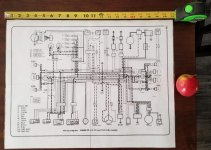
I downloaded the "GSX250-400-GS450 Wiring Diagrams (US+UK)" PDF file from BikeCliff's website. and had a tough time following the wires while WAY zoomed in. I needed to print out my particular wiring diagram (GS450TXZ) and cleaned it up so not to waste too much toner in the laser printer. After clearing up the image and removing all of the background noise, I scaled it to fit on 4 pages.
I CAN FINALLY SEE WHERE THE WIRES GO!
After trimming each page, taping them together, and laminating them with said tape... I figured other people might be in the same boat as me so I cleaned ALL of the wiring diagrams in that file. Some came out better than others, but i think every image is improved and optimized for printing. I kept every picture in the same order but I rotated them to landscape view.
How i printed mine?
Here is my "cleaned" version of the wiring diagrams.
I hope this helps someone! It sure helped me
Download my version of the PDF file here. (mods, feel free to store this file locally. it was too big to attach to this post)
Hey Gang,
I have realized as I've gotten older that my aging eyes are, well... , aging!
I downloaded the "GSX250-400-GS450 Wiring Diagrams (US+UK)" PDF file from BikeCliff's website. and had a tough time following the wires while WAY zoomed in. I needed to print out my particular wiring diagram (GS450TXZ) and cleaned it up so not to waste too much toner in the laser printer. After clearing up the image and removing all of the background noise, I scaled it to fit on 4 pages.
I CAN FINALLY SEE WHERE THE WIRES GO!
After trimming each page, taping them together, and laminating them with said tape... I figured other people might be in the same boat as me so I cleaned ALL of the wiring diagrams in that file. Some came out better than others, but i think every image is improved and optimized for printing. I kept every picture in the same order but I rotated them to landscape view.
How i printed mine?
- opened up the PDF with GIMP (free image editing software) and selected the image i needed at 500% resolution.
- Next, I exported the image as a simple JPG file.
- then opened it with MS Paint and printed in landscape view at about 200% (2x2 pages) with the default margins.
Here is my "cleaned" version of the wiring diagrams.
I hope this helps someone! It sure helped me
Download my version of the PDF file here. (mods, feel free to store this file locally. it was too big to attach to this post)
Attachments
Last edited: