• This forum allows conversation on non-controversial topics, therefore no politics or religion. "The Campfire" is an area meant for casual, civil discussions. Deliberate anti-social activity including personal insults, profanity, pornography, racism, threats and purposely inflammatory posts may result in suspension of forum access or possibly a permanent ban from GSR.

    The words insight and incite are pronounced the same. But one of them will get you banned and the other will not. Before hitting the Submit button be certain which of the two better describes your post.

  • Required reading for all forum users!!!

    Welcome!
    Register to access the full functionality of the GSResources forum. Until you register and activate your account you will not have full forum access, nor will you be able to post or reply to messages.

    A note to new registrants...
    All new forum registrations must be activated via email before you have full access to the forum.

    A Special Note about Email accounts!
    DO NOT SIGN UP USING hotmail, outlook, gmx, sbcglobal, att, bellsouth or email.com. They delete our forum signup emails.

    A note to old forum members...
    I receive numerous requests from people who can no longer log in because their accounts were deleted. As mentioned in the forum FAQ, user accounts are deleted if you haven't logged in for the past 6 months. If you can't log in, then create a new forum account. If you don't get an error message, then check your email account for an activation message. If you get a message stating that the email address is already in use, then your account still exists so follow the instructions in the forum FAQ for resetting your password.

    Have you forgotten your password or have a new email address? Then read the forum FAQ for details on how to reset it.

    Any email requests for "can't log in anymore" problems or "lost my password" problems will be deleted. Read the forum FAQ and follow the instructions there - that's what we have one for...

  • Returning Visitors

    If you are a returning visitor who never received your confirmation email, then odds are your email provider is blockinig emails from our server. The only thing that can be done to get around this is you will have to try creating another forum account using an email address from another domain.

    If you are a returning visitor to the forum and can't log in using your old forum name and password but used to be able to then chances are your account is deleted. Purges of the databases are done regularly. You will have to create a new forum account and you should be all set.

Computer Help

Looks like Windows 11 is preinstalled and the account's name is " Dell " . I'm guessing it was set up without a Microsoft account which is what I want . I had been a bit worried because of the way I had found out it was delivered { hearing a loud thud outside my door } but everything appears working . Just working on installing " open shell " so it looks like Windows 7 which is familiar to me ...... Going to make this a slow process so I'll have lots of questions ...... One of which is how to get my personal banking information off the old one so I can pass it on to a friend ......

Unless there is stuff on your old computer you want your friend to have I would just do a fresh install when you're done. You can download the "mediacreationtool.exe" from Microsoft, create a bootable ISO or USB and if it's already a legit version it will just auto register the key. Odd that it came with the OOBE already having been run. Oh well.
 
Unless there is stuff on your old computer you want your friend to have I would just do a fresh install when you're done. You can download the "mediacreationtool.exe" from Microsoft, create a bootable ISO or USB and if it's already a legit version it will just auto register the key. Odd that it came with the OOBE already having been run. Oh well.

Thanks Sandy . There is some stuff my friend wants { My entire Itunes library } .... But I googled Firefox and I believe { feel free to correct me } that if I uninstall the Firefox program and then go into file explorer and delete the " profile " that will get rid of any password information and any record of sites I have visited ..... Today's project .... Get Thunderbird up and running with all three of my email accounts ..... Coffee first .....Much coffee ......

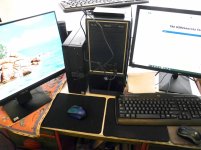
My desk is a bit cluttered . Look at the difference in size between the old and new computer..... Once everything is done there will be the small computer, one keyboard, one mouse, and two monitors ......

dell.jpg - Click image for larger version  Name:	dell.jpg Views:	0 Size:	152.8 KB ID:	1771572
 
Thanks Sandy ..... All three emails are up and running ..... Didn't transfer my contacts because the only way I could find was to transfer the profile which involved the email settings as well .... Didn't want to mess with what is working...... So I printed it out instead ..... I can add it slowly and do some much needed editing to the list ...... I had a little problem with tabs I had closed opening back up in Firefox until I realized that the two computers were still synced { how I got my bookmarks over } . Once I severed the connection all was fine ....

So far

Firefox and all bookmarks transferred

Thunderbird up and running

Printer working on both computers

libreoffice installed . Thanks Syd ....

Qobuz streaming app installed

Pictures file moved to new computer

Not so successful moving documents. Notepad and Wordpad are two different animals . The information is there it's just blended in with gobbly gook . Not sure what to do about that .....

 
Not so successful moving documents. Notepad and Wordpad are two different animals . The information is there it's just blended in with gobbly gook . Not sure what to do about that .....


Aren't those files just saved as *.txt or *.rtf files under your documents folder, or is that where the gobbly gook is happening. LOL.
 
Aren't those files just saved as *.txt or *.rtf files under your documents folder, or is that where the gobbly gook is happening. LOL.

Document transferred and opened with Notepad in Windows 11 { rtf file }

specs 11.jpg
 
I did a little Google search to see if I could get Wordpad back .... Woohoo ! .... I can from a site called Winaero ....Just installed it on the Windows 11 computer and Wordpad solved the problem.....
 
I did a little Google search to see if I could get Wordpad back .... Woohoo ! .... I can from a site called Winaero ....Just installed it on the Windows 11 computer and Wordpad solved the problem.....

Yes, good. Microsoft stopped supporting rtf files in notepad with Windows 11 so it displays all the rtf formatting.
 
This is an interesting little wrinkle .... I have about 40 tabs open on Firefox ..... When I am finished with looking at a page and hit the home button , two additional tabs open . The first is GSresouces and the second is Mozilla's account page. Happening on both computers .......
 
Well I solved that problem . Somehow Firefox setup had entered multiple addresses for my home page selection ' Switched it back to Google and problem solved......Got my cracked Photoshop up and running. And I'm pretty sure I have my documents and photos either all transferred or on a portable hard drive ..... Next job to transfer paid versions of Malwarebytes and Ccleaner to the new computer ..... Then I can start on cleaning out the old computer. Pretty sure the only security issue will be uninstalling Firefox and making sure the " profile " folder gets nuked ......
 
Unless there is stuff on your old computer you want your friend to have I would just do a fresh install when you're done. You can download the "mediacreationtool.exe" from Microsoft, create a bootable ISO or USB and if it's already a legit version it will just auto register the key. Odd that it came with the OOBE already having been run. Oh well.
That sounds a little complicated . Do you think I could accomplish the same thing using the reset method in the video below ? { using the nuking everything option }

 
That sounds a little complicated . Do you think I could accomplish the same thing using the reset method in the video below ? { using the nuking everything option }


I've alway done full reloads but then I usually have media at hand and you don't need to sit around for most of the process. That being said the reset process looks like the easiest way to do it. Never used it so forgot about it. LOL.
 
Today is my first day using the new computer exclusively . One thing I can't figure out is the clock display . In Windows 10 there is a calendar and a clock with minutes and seconds . In Windows 11 no clock so no seconds.... I often use that clock to time my morning eggs . But can't figure out how to display it .... There is a section above the calendar currently showing " Notifications " .....
 
Never mind .... Figured out the " seconds " problem ..... Discovering things look different on my computer versus the Google solutions I find is frustrating ......
 
Paid versions of Malwarebytes and Ccleaner up and running on the new computer. As well as Itunes account moved. I left the Itunes library on the portable hard drive as it was massive { 500 gigs. } ...... Took me a while to figure out how to run the program from the computer but keep the library on the portable hard drive but I got through it..... I can see storage may be a problem for the future so I ordered a 5 terabyte portable hard drive from Amazon . I'm down to 500 gigs of storage left on the 1 terabyte one I have now ..... Time to turn my attention to the old computer .... First job will be to address the " Computer crashed due to power surge " message ....... I'll have to turn that off in the Bios ...... Job for tomorrow ......
 
Probably not except if you have a port that is always powered up for USB device charging. They're usually on the front though.

This is what is there " 5 x USB 3.1, 4 x USB 2.0, 1 x USB 3.1 Gen 2 Type-C with PowerShare port, " The five 3.1's are grouped together on the back of the computer. Two are free. Can I use one of those ? { There are three usb ports on the front . not sure what they are }
 
This is what is there " 5 x USB 3.1, 4 x USB 2.0, 1 x USB 3.1 Gen 2 Type-C with PowerShare port, " The five 3.1's are grouped together on the back of the computer. Two are free. Can I use one of those ? { There are three usb ports on the front . not sure what they are }

If the picture of your computer is correct on the front the USB port that is blue is the USB 3.1, the one below it is the USB C, and the one beside it would be a USB 2.0 and the below that is a USB (probably 2.0) also with Powershare. You can tell by the extra little symbol on it.
 
Pretty much finished the switch .... Can't imagine doing it without another computer along side to look up things. Special thanks to Sandy and Syd for their help ..... Just did a clean reset of the old computer to pass it on . Also went into the Bios and turned off that damn " power surge detected during last power up " crash feature........Now I'm waiting on my backed up itunes to load. One of the reasons my friend wanted it was for the music ..... Then I'll probably be asking questions about using two monitors ......
 
Last edited:
Back
Top