• Required reading for all forum users!!!

    Welcome!
    Register to access the full functionality of the GSResources forum. Until you register and activate your account you will not have full forum access, nor will you be able to post or reply to messages.

    A note to new registrants...
    All new forum registrations must be activated via email before you have full access to the forum.

    A Special Note about Email accounts!
    DO NOT SIGN UP USING hotmail, outlook, gmx, sbcglobal, att, bellsouth or email.com. They delete our forum signup emails.

    A note to old forum members...
    I receive numerous requests from people who can no longer log in because their accounts were deleted. As mentioned in the forum FAQ, user accounts are deleted if you haven't logged in for the past 6 months. If you can't log in, then create a new forum account. If you don't get an error message, then check your email account for an activation message. If you get a message stating that the email address is already in use, then your account still exists so follow the instructions in the forum FAQ for resetting your password.

    Have you forgotten your password or have a new email address? Then read the forum FAQ for details on how to reset it.

    Any email requests for "can't log in anymore" problems or "lost my password" problems will be deleted. Read the forum FAQ and follow the instructions there - that's what we have one for...

  • Returning Visitors

    If you are a returning visitor who never received your confirmation email, then odds are your email provider is blockinig emails from our server. The only thing that can be done to get around this is you will have to try creating another forum account using an email address from another domain.

    If you are a returning visitor to the forum and can't log in using your old forum name and password but used to be able to then chances are your account is deleted. Purges of the databases are done regularly. You will have to create a new forum account and you should be all set.

Do I need to be upgraded to post more than one pic or am I just lame.

  • Thread starter Thread starter renorealtors
  • Start date Start date
R

renorealtors

Guest
I see others post multiple pics and when I try I get a pop up saying I am only allowed one pic???
 
This is a test only.[FONT=&quot]https://imgur.com/9Qsd1q8 [/FONT][FONT=&quot]https://imgur.com/4fsF8Vm [/FONT][FONT=&quot]https://imgur.com/gi55gK3[/FONT]
 
I joined imgur and uploaded some pics. How do I get them into a thread?? I tried "copying the link" and pasting on the last post below and the pics did not show up?? I need things Crayon Style:confused:
 
The Imgur app (for phone or tablet) is great for uploading pics from your phone (or tablet). If you're trying to use the Imgur app to get the bbcode to paste into forum posts, it cant be done (as far as I know). Open the full Imgur desktop site on a pc, laptop, or tablet, or phone browser (Safari), not the app. - SAFARI ON IOS DOES NOT LIKE TO TO THIS, even when you press the AA in the Address Bar and Request Desktop Website.

Edit 12/16/24- currently, I have only found the Firefox and Opera Browsers for iPhone will allow me to show the Imgur full desktop site, and it was a major chore to do it. So now I only use Firefox or Opera for Imgur to get the BBCode.


On Desktop site, If you click on an image and the resulting window doesn't look like the ones below with the file types and image sizes to the right, you may be in the Beta version of the full site. Get out of the BETA Version.

If you see this icon in the lower right of the Screen
ocllcGEm.jpg

Click on it to Use Old Design. This may be the only way to get to the BBCode.

Click on your image, it will open in an editing window, with a bunch of file types on the right. At the bottom of the list of file types are a list of sizes. Choose the size first (you'll need to experiment with which size to use for a given image. I’ll show some examples below). Then click the copy button next to the BBCode. (The preceding operation is very fiddly using a phone, the Imgur full desktop site must be used to get the BBCode, and it's not a great time doing this on a phone, but is possible). Paste [CTRL-V] it into you post. No need to mess with any of the fancy buttons in the reply toolbar.

Repeat for as many picture as you want to put in a single post (there was a max limit of 10, not sure what it is now after the site upgrade, but its more than 10)

To add space between your pictures:
Hitting the ENTER button once after the BBCode entry will line them up vertically.

Hitting the ENTER button twice will put a blank line between them, so you can see where one ends and the next one begins.

Original Size:
9LX9FAU.jpg


Large thumbnail:
9LX9FAUl.jpg


small thumbnail:
9LX9FAUt.jpg


If I open Imgur in Opera on my iPhone or iPad (full site), I can get the BBCode just like using my desktop and can embed pics on the forum. No go on the app.
Imgur's iPhone app works the same as Flickr evidently. I did a search and found this:

"Please note that BBCodes are not available on the app. They can be only be found on the desktop website, or full site on a mobile device."

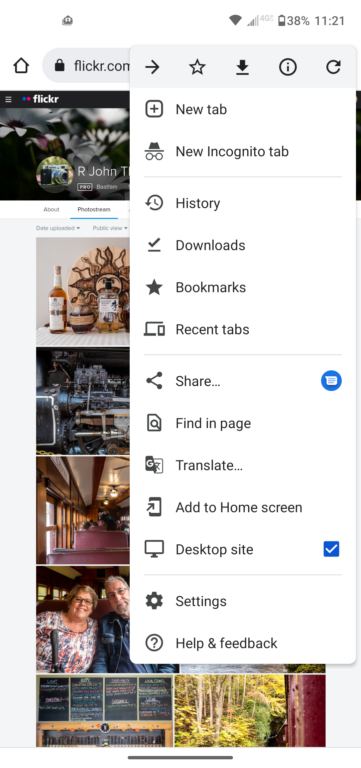
Video below shows how to do the same using Flickr:

Note: if using mobile device, you may have to find a pull down menu to change to desktop site. The Mobile version of the Flickr site will not reveal the BBCode for you to copy/paste into forums.
ivDqs1.png


Using Flickr:

Using Imgbb:
If you want your pics to show up in the forum, on the IBB page, you have to go to the Embed codes (bottom Left) and copy the BBCode-full image, and paste it into your post.

Using Image Shack:
 
Last edited:
Now just hit the enter button a couple of times between pictures and you can have them in line down the page like this:
Hitting the ENTER button once will line them up vertically.

Hitting the ENTER button twice will put a blank line between them, so you can see where one ends and the next one begins. :encouragement:

.
 
Back
Top