• Required reading for all forum users!!!

    Welcome!
    Register to access the full functionality of the GSResources forum. Until you register and activate your account you will not have full forum access, nor will you be able to post or reply to messages.

    A note to new registrants...
    All new forum registrations must be activated via email before you have full access to the forum.

    A Special Note about Email accounts!
    DO NOT SIGN UP USING hotmail, outlook, gmx, sbcglobal, att, bellsouth or email.com. They delete our forum signup emails.

    A note to old forum members...
    I receive numerous requests from people who can no longer log in because their accounts were deleted. As mentioned in the forum FAQ, user accounts are deleted if you haven't logged in for the past 6 months. If you can't log in, then create a new forum account. If you don't get an error message, then check your email account for an activation message. If you get a message stating that the email address is already in use, then your account still exists so follow the instructions in the forum FAQ for resetting your password.

    Have you forgotten your password or have a new email address? Then read the forum FAQ for details on how to reset it.

    Any email requests for "can't log in anymore" problems or "lost my password" problems will be deleted. Read the forum FAQ and follow the instructions there - that's what we have one for...

  • Returning Visitors

    If you are a returning visitor who never received your confirmation email, then odds are your email provider is blockinig emails from our server. The only thing that can be done to get around this is you will have to try creating another forum account using an email address from another domain.

    If you are a returning visitor to the forum and can't log in using your old forum name and password but used to be able to then chances are your account is deleted. Purges of the databases are done regularly. You will have to create a new forum account and you should be all set.

LED Turns WITH stock self cancelling (Working)

danny01975

Forum Mentor
Super Site Supporter
Past Site Supporter
So I recently switched my incandescent bulbs to LEDs. Much brighter, and now I don't have to search high and low for 23/8 Bay 15d bulbs. But my self cancelling didn't work anymore. Honestly, I always thought the stock canceling was way too short at 9 seconds. So I wired up this solid state relay / timer. It has all sorts of different timer modes. I programmed it to turn on as soon as the switch is activated, then it waits for the auto cancel signal from the TSCU, then waits and additional 20 seconds before turning off the lights. If you activate the switch at any point, the process starts all over. So the TSCU is what's controlling the relay, which is controlling the flasher. Exactly how the stock flahser worked. Except this one is a little smarter.

Now I have LED lights + the stock functionality of the TSCU with the whole speed sensing timer thing, AND more time. And I can adjust it to whatever timer works best for me.

We'll see how well it works over time. Just thought I'd share in case others there want LED but still want self cancelling. There are other ways to do this as well, but this wasn't that hard to do and wasn't that expensive.

This is how it's wired.

Update: 5/25 This has been working flawlessly since I posted this back in February. Time to clean up the "test wiring" under the side cover and make it permanent.
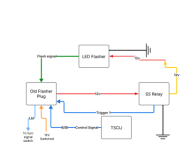
Blank diagram.png - Click image for larger version  Name:	Blank diagram.png Views:	82 Size:	13.4 KB ID:	1764239
 
Last edited:
Update 7/25
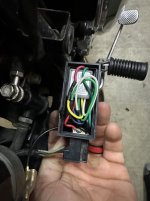
I was able to make 3D printed case to house the flasher and relay. Finding a male flasher plug with wires was impossible, so I bought a cheap flasher from the auto parts store a took it apart and stole the metal blades out of it. Now I have the whole thing in one box slightly bigger than the original flasher. It just plugs into the stock harness. If I ever need to go back to factory, I can just unplug it and plug in the old one. This looks way neater too. I can't believe how long it worked in that rats nest of a "temp" setup.​
Click image for larger version  Name:	IMG_4863.jpg Views:	18 Size:	72.1 KB ID:	1772550
 
Last edited:
Back
Top