• Required reading for all forum users!!!

    Welcome!
    Register to access the full functionality of the GSResources forum. Until you register and activate your account you will not have full forum access, nor will you be able to post or reply to messages.

    A note to new registrants...
    All new forum registrations must be activated via email before you have full access to the forum.

    A Special Note about Email accounts!
    DO NOT SIGN UP USING hotmail, outlook, gmx, sbcglobal, att, bellsouth or email.com. They delete our forum signup emails.

    A note to old forum members...
    I receive numerous requests from people who can no longer log in because their accounts were deleted. As mentioned in the forum FAQ, user accounts are deleted if you haven't logged in for the past 6 months. If you can't log in, then create a new forum account. If you don't get an error message, then check your email account for an activation message. If you get a message stating that the email address is already in use, then your account still exists so follow the instructions in the forum FAQ for resetting your password.

    Have you forgotten your password or have a new email address? Then read the forum FAQ for details on how to reset it.

    Any email requests for "can't log in anymore" problems or "lost my password" problems will be deleted. Read the forum FAQ and follow the instructions there - that's what we have one for...

  • Returning Visitors

    If you are a returning visitor who never received your confirmation email, then odds are your email provider is blockinig emails from our server. The only thing that can be done to get around this is you will have to try creating another forum account using an email address from another domain.

    If you are a returning visitor to the forum and can't log in using your old forum name and password but used to be able to then chances are your account is deleted. Purges of the databases are done regularly. You will have to create a new forum account and you should be all set.

Switch wiring...quick question.

  • Thread starter Thread starter mattfeet
  • Start date Start date
M

mattfeet

Guest
How do the white/red and white/green wires plug into my new switch? They were originally wired into the master ON/OFF headlight switch.

ef6be4f4712ee96f47c2d0248f87a17d_zps2538da0e.jpg


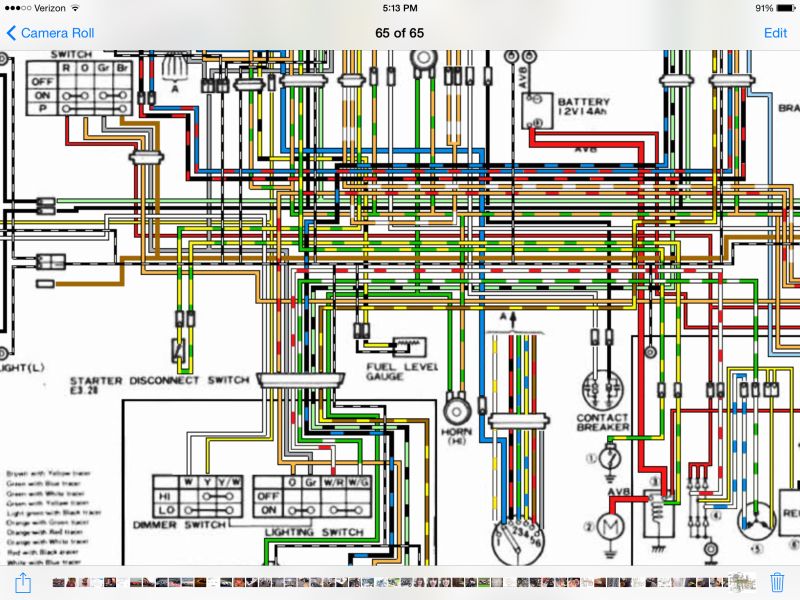
Diagram
80dc496e086632917ed0e7fc8bf1b605_zpse7af3995.jpg


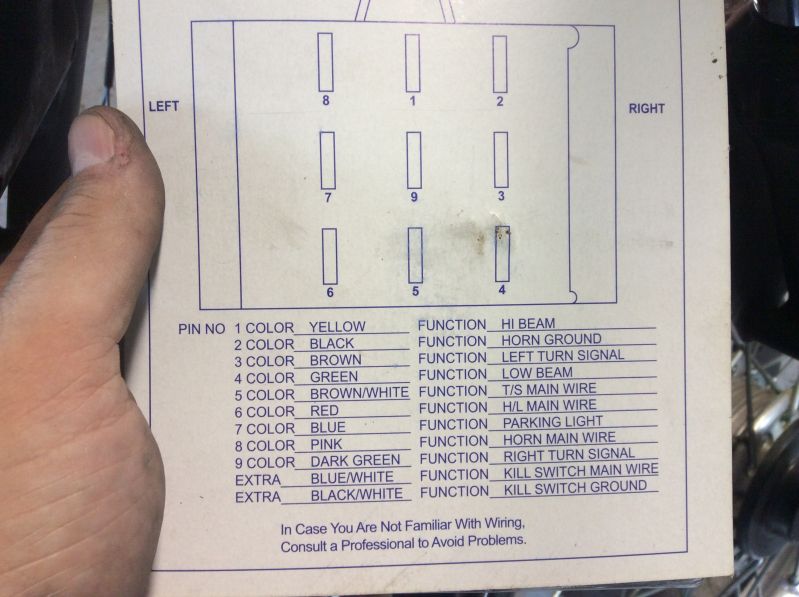
New switch diagram
e296da65c2cad0fe4d3c203b726ed6a5_zpsdbc78fcd.jpg


Everything seems to be working just fine even without them hooked up. These are the only two remaining wires from my OEM harness that are homeless. Thanks for the help!

matt
 
Ok, so when the headlight master is set to ON the power runs back to the AC generator and the rectifier. Since the new switch isn't set up that way, don't I just want to tap them into the HL main wire (red) of the new harness? I have red (new) connected to orange (OEM) for main HL wire, which comes from the ignition switch.
 
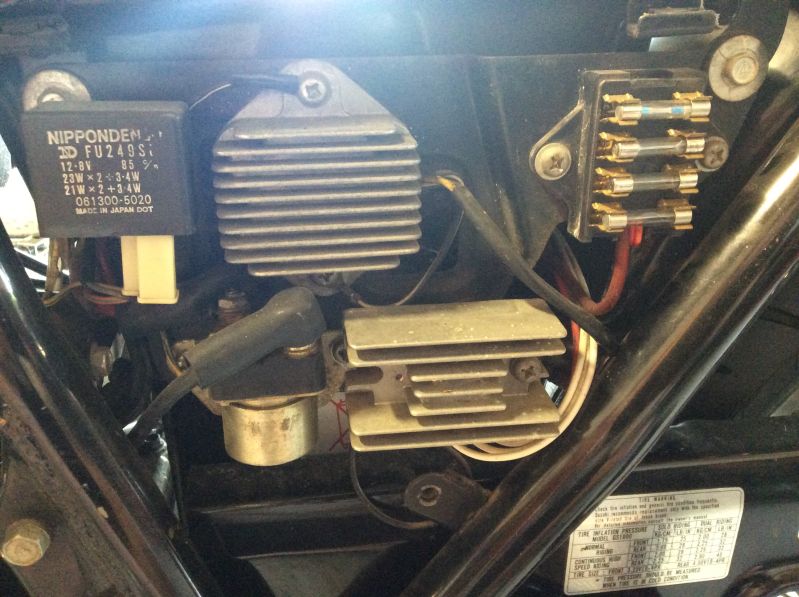
You will want those wires connected to.... nothing. Make sure all 3 of your stator wires are hooked up directly to your R/R.
 
Whoa whoa whoa...it's like I was sitting on a fastball and you just came in and threw me a curve. Why do I do that? Is it something GS owners hAve found to improve the stock harness? I'm glad I asked.

Matt
 
I found this in an old post "As a half-way measure, you will find that one of your stator wires connects to a white wire with a green stripe. Disconnect that connection. You will find another wire that is white with a RED stripe that probably leads to the plug into which the R/R plugs. Find the bullet connector in that wire, disconnect it. Now, connect the stator wire that went to the white/green wire and connenct it to the white/red wire that is going to the R/R. Doing this will maintain your connector on the R/R, but your real goal should be to minimize the number of connections between the stator and R/R."

Is is it ok to just connect these two wires for the time being?
 
Your original switch cut out one phase of the stator when the headlight was turned off. Now that your headlight is always on, you want all 3 phases of the stator to be flowing through the R/R. Voltage coming out of the stator is AC. The R/R converts it to DC and regulates how much voltage is being put into the bike. Everything on the bike runs on DC voltage which must be capped off to prevent frying stuff.
 
So can I connect those two wires together or do I need to rewire the RR and stator now? The bike wasn't having any issue at all before...I'm just adding new switches.

Matt
 
The white/green and white/red wires from the harness side can be connected to each other or just left loose. They aren't doing anything. The important thing is that all 3 stator wires are connected directly to the R/R.
 
Can you link me to a post or diagram showing what I need to do? I don't have a desktop so searching a bunch on my iPad is cumbersome. I appreciate the help!

Im im about to finalize all of my connections. I know you said I could do either/or but would it be best to connect or leave disconnected?
 
Can you link me to a post or diagram showing what I need to do? I don't have a desktop so searching a bunch on my iPad is cumbersome.

Sorry about your luck.

Find the three wires coming from the stator that connect to the Rectifier. One of those wires will be interrupted to go to a white/green wire in the harness and then continue via a white/red wire to the Rectifier. Disconnect both of those wires, connect the stator wire directly to the Rectifier wire.

The other end of those white/green and white/red wires are the ones at your now-defunct headlight switch. Yes, it's possible to connect them together, but there are a few other connections and plugs along the way, so eliminating that section of the harness will ultimately help your bike.

.
 
Sorry if my earlier post frustrated you. I'll cap the wires off and look into the other items.

Two more questions:

How can I wire my kill switch trigger to work as a passing switch? (Flashes brights)

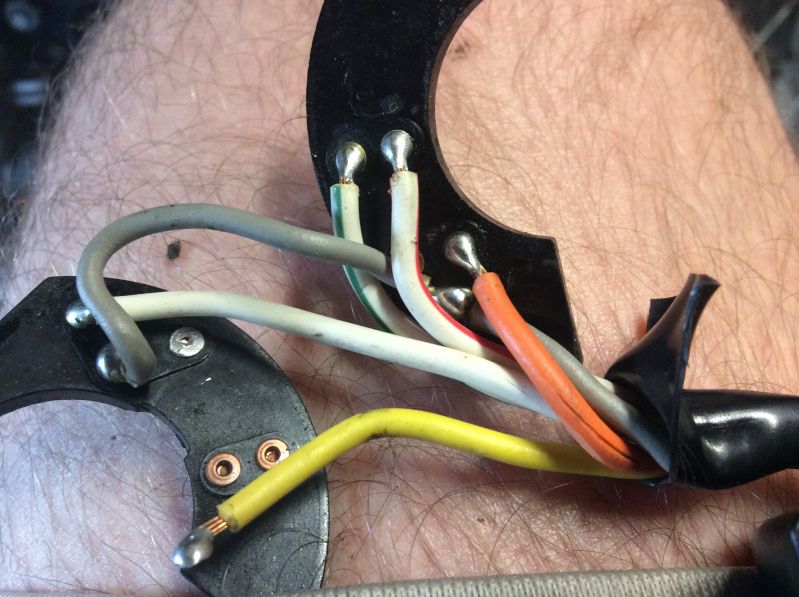
Are the orange and gray wires hooked up correctly as shown or do they need to be flipped?
 
Sorry if my earlier post frustrated you. I'll cap the wires off and look into the other items.

Two more questions:

How can I wire my kill switch trigger to work as a passing switch? (Flashes brights)

Are the orange and gray wires hooked up correctly as shown or do they need to be flipped?

Never heard of that being done. So you are planning to lose the kill switch function?
 
This is the switch I bought and I read that you can just wire the trigger function as a passing/flashing. My right hand switches already have a kill so its redundant.
 
How can I wire my kill switch trigger to work as a passing switch? (Flashes brights)
Silly question coming back at ya, but why not just use the high beam selector? The 'kill' switch would not be a good choice for a passing switch, as it latches. A passing switch should be spring-loaded and momentary-contact.

Besides, what would you use for the 'kill' switch? :-k


Are the orange and gray wires hooked up correctly as shown or do they need to be flipped?

Not sure what you are using as reference points, neither can I tell what it is you have them connected to.

In the stock wiring, the orange wire is an extension of the orange/red wire that feeds the lights. In the headlight switch, it is connected to the gray wire, which will then feed the tail light. You will have to examine your own wiring to see if that is the way you have it connected.


If you get really stuck, let me know, I'm just up the road from you.

.
 
I think that "kill" switch is momentary. My SV650 had the wxeaxt same setup except it was for flashing high beams to pass. I never used it but its more functional to me than the momentary kill is.
 
My bad...just realized I didn't post the pictures with my connections. I have NEW red to OEM orange and NEW blue to OEM gray.
 
So what do I Need to plug into what?
You already have the wiring schematic for the bike and the wiring diagram for the switch.

Just follow the function, not necessarily the wire color, and connect it where it works.

And, ... that picture doesn't help anything.

.
 
Back
Top