• Required reading for all forum users!!!

    Welcome!
    Register to access the full functionality of the GSResources forum. Until you register and activate your account you will not have full forum access, nor will you be able to post or reply to messages.

    A note to new registrants...
    All new forum registrations must be activated via email before you have full access to the forum.

    A Special Note about Email accounts!
    DO NOT SIGN UP USING hotmail, outlook, gmx, sbcglobal, att, bellsouth or email.com. They delete our forum signup emails.

    A note to old forum members...
    I receive numerous requests from people who can no longer log in because their accounts were deleted. As mentioned in the forum FAQ, user accounts are deleted if you haven't logged in for the past 6 months. If you can't log in, then create a new forum account. If you don't get an error message, then check your email account for an activation message. If you get a message stating that the email address is already in use, then your account still exists so follow the instructions in the forum FAQ for resetting your password.

    Have you forgotten your password or have a new email address? Then read the forum FAQ for details on how to reset it.

    Any email requests for "can't log in anymore" problems or "lost my password" problems will be deleted. Read the forum FAQ and follow the instructions there - that's what we have one for...

  • Returning Visitors

    If you are a returning visitor who never received your confirmation email, then odds are your email provider is blockinig emails from our server. The only thing that can be done to get around this is you will have to try creating another forum account using an email address from another domain.

    If you are a returning visitor to the forum and can't log in using your old forum name and password but used to be able to then chances are your account is deleted. Purges of the databases are done regularly. You will have to create a new forum account and you should be all set.

To someone with experience with Points..

  • Thread starter Thread starter TheCafeKid
  • Start date Start date
T

TheCafeKid

Guest
Im going thru my points system and i have my manual, but again im not a great learner thru reading and this manual isnt exactly friendly to someone who's never really messed with them. Anyone have any expertise with these that would mind giving me some pointers? no pun intended..heh..

Thanks in advance!

TCK
 
Esh..helped a little but not a whole lot. Part of the problem is my manual is showing me how, and the picture diagrams show two different styles of points set ups. The adjustment screws they point out in the diagram arent the same set up as mine, and its a bit frustrating because i dont want to screw something up..lol
 
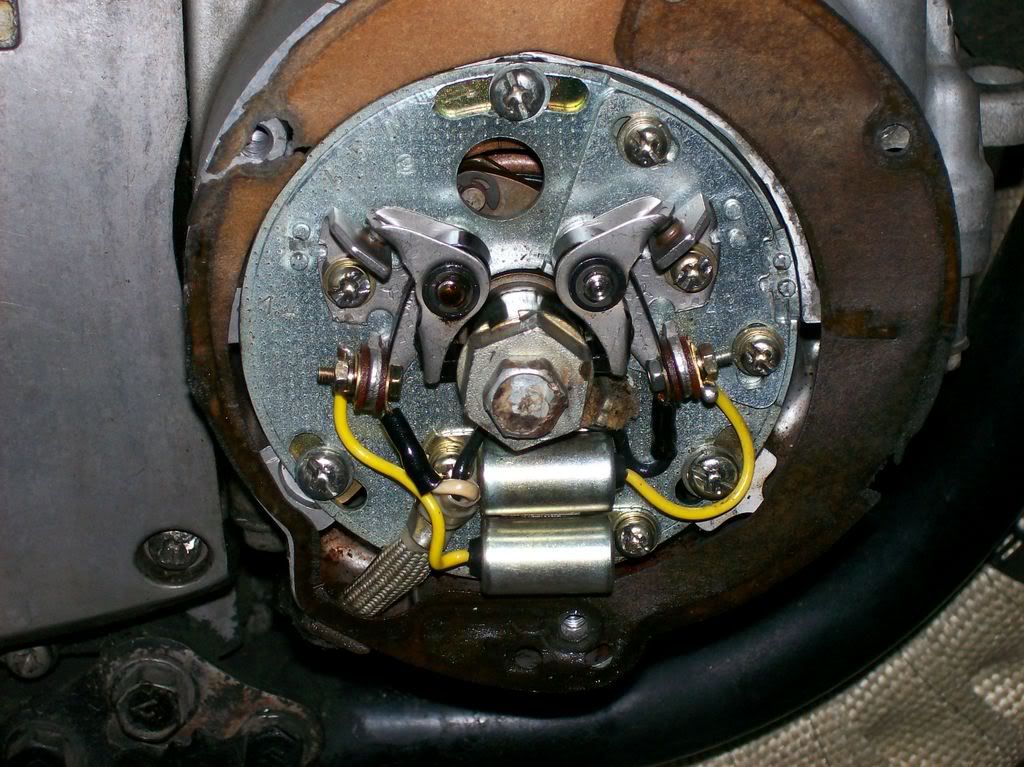
Could you post a pic of your points? The ones in the post I think are KD system.
 
Yeah..gimme a few and i'll run out and snap a pic of em if there's enough light...
 
Here ya go..
100_0226.jpg
 
Yeah..gimme a few and i'll run out and snap a pic of em if there's enough light...

Yes. Give us a picture of them if you can. There are two different types of points/condensor setups. You can see the differences in the parts book. Separate pages for each type.

Cheers. Don
 
Hi TCK. If you are purchasing points/condensors for your bike the type to order are the ND ones, as opposed to the Kokusan type which are the other type used on the GS750B model.

The position that you have the base plate in with the screw in the midway position at 12 o'clock is correct for setting the points gap. The gap is 0.014" on both sets of points at the widest gap. If you need any further info on the timing side of things let me know. Your workshop manual should describe this task.

Cheers

Don
 
Thanks Don, actually my question is more in reference to adjustment. The points seem to be in nearly new shape, no wear, rounding or pitting. My manual shows more of the KD set up than the ND, and i am not sure which screws to loosen to adjust per the manual's instruction...any help with that sir??

Thanks!
TCK
 
Definately ND.Just loossen screw on ground side and use screw driver in slot to adjust gap on 1-4 set.Then turn motor 180 deg and adjust 2-3 set.Check timing with 12v test light on 1-4 set to spec.Check 2-3 set for timing and adjust by +/_ point gap.Open to advance close to retard.
 
Thanks Don, actually my question is more in reference to adjustment. The points seem to be in nearly new shape, no wear, rounding or pitting. My manual shows more of the KD set up than the ND, and i am not sure which screws to loosen to adjust per the manual's instruction...any help with that sir??

Thanks!
TCK

When the points are gapped correctly the timing is done first on cylinders 1.4. According to my Suzuki Factory GS750 Manual the point gap is 0.018" and not 0.014" as on my GS550B. You will need to attach some kind of device to the points on the left hand side (Cyl 1 & 4) to indicate when the points open and close. Maybe a multimeter or continuity light. One lead to points and one lead to earth. Turn the crankshaft clockwise using the 19mm bolt (do not use the smaller bolt that holds the auto advance unit) until the points are just opening and the light is just coming on when the stationary pointer is lined up with the |F1.4 mark on auto advance unit. If it does not line up loosen the three screws on the large base plate and rotate until the timimg light does come on at the correct moment. When this is completed, do the same thing for the set of points on the right hand side. This time line up the timing marks for cylinders 2.3
(|F2.3). If adjustment is required then move the small plate that the points on the right hand side are mounted to so you can obtain correct timing on cyl 2.3.
I think I have covered everything. If I have left anything out, get back to me.

Cheers

Don

P.S. You do not have to open or close points to adjust ignition timing. That's what the slots on the base plate and auxiliary plate are for. Moving these plates advances and retards the timing respectively.
 
Last edited:
Back
Top