• Required reading for all forum users!!!

    Welcome!
    Register to access the full functionality of the GSResources forum. Until you register and activate your account you will not have full forum access, nor will you be able to post or reply to messages.

    A note to new registrants...
    All new forum registrations must be activated via email before you have full access to the forum.

    A Special Note about Email accounts!
    DO NOT SIGN UP USING hotmail, outlook, gmx, sbcglobal, att, bellsouth or email.com. They delete our forum signup emails.

    A note to old forum members...
    I receive numerous requests from people who can no longer log in because their accounts were deleted. As mentioned in the forum FAQ, user accounts are deleted if you haven't logged in for the past 6 months. If you can't log in, then create a new forum account. If you don't get an error message, then check your email account for an activation message. If you get a message stating that the email address is already in use, then your account still exists so follow the instructions in the forum FAQ for resetting your password.

    Have you forgotten your password or have a new email address? Then read the forum FAQ for details on how to reset it.

    Any email requests for "can't log in anymore" problems or "lost my password" problems will be deleted. Read the forum FAQ and follow the instructions there - that's what we have one for...

  • Returning Visitors

    If you are a returning visitor who never received your confirmation email, then odds are your email provider is blockinig emails from our server. The only thing that can be done to get around this is you will have to try creating another forum account using an email address from another domain.

    If you are a returning visitor to the forum and can't log in using your old forum name and password but used to be able to then chances are your account is deleted. Purges of the databases are done regularly. You will have to create a new forum account and you should be all set.

Too Much Confusion... need definitive screw/jet adjustment numbers

  • Thread starter Thread starter aedi006
  • Start date Start date
A

aedi006

Guest
First the info: '82 GS850GL - Stock
I have tried hard to do my homework on this one... but different thread/people/days use different names for the screws and jets in carbs. Here I will be using the terminology and pictures (so there can be no doubt) from the carb rebuild series hosted here on GSResources. For each of the four screw/jets I have found in the carb rebuild I need the following info (I also realize that different people/bikes will have different answers to these questions, but more infor is better than my current confusion):

a. Should it be fully seated (i.e. tight so I can no longer turn)?
b. If not fully seated, how many turns off fully seated?
c. If the adjustment is not turn based how is it done (for example I think the process for adjusting part #1, air screw, is to turn it while idling until peak idle is found)?
d. What does the screw/jet control
e. What are the alternative names for the screw/jet
f. I have some slight backfire, will adjusting this screw/jet help (I am also checking for exhaust leaks)?

The naming convention is:

Part #1 - Air Screw - First Picture
Part #2 - Air Jet - Second Picture
Part #3 - Needle Jet (or Main Jet, both used in Rebuild series) - Third Picture
Part #4 - Pilot Jet - Fourth Picture


#1
026_Air%20screw%20removed.jpg

#2
031_Air%20jet%20removed.jpg

#3
060_Needle%20jet%20removed%20out%20top%20of%20carb.jpg

#4
064_Pilot%20jet%20removed.jpg


To help here is a form for the answers:

Part # XX
a. XX
b. XX
c. XX
d. XX
e. XX
f. XX

Thanks in advance.
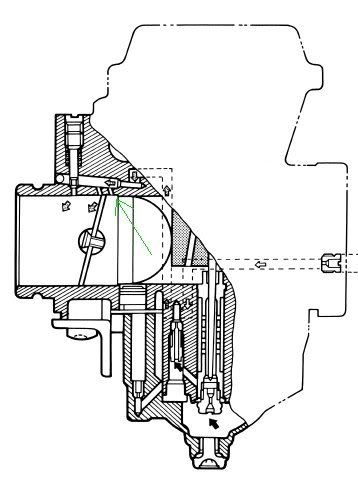
 
Only the Air Screw is adjustable. Set it to 1.75 turns from fully seated and then adjust slightly for best idle (should be within 3/4 turn). All other jets should be fully seated to make sure they don't vibrate loose.
 
OK, I'll take a stab at this.

Part # 1 - air screw
a. Should it be fully seated (i.e. tight so I can no longer turn)? NO.
b. If not fully seated, how many turns off fully seated? Start with about 1 1/2 to 2 turns out.
c. If the adjustment is not turn based how is it done? Adjust for peak idle after engine is at operating temperature. Adjust idle speed with main idle control as necessary.
d. What does the screw/jet control? It adjusts the mixture at idle and very low throttle settings.
e. What are the alternative names for the screw/jet? Idle mixture.
f. I have some slight backfire, will adjusting this screw/jet help (I am also checking for exhaust leaks)? If it is not out far enough, the mixture might be rich enough to cause a bit of backfiring.


Part # 2 - air jet
a. Should it be fully seated (i.e. tight so I can no longer turn)? Yes, install until snug.
b. If not fully seated, how many turns off fully seated? Fully-seated.
c. If the adjustment is not turn based how is it done? No adjustment.
d. What does the screw/jet control? Controls maximum amount of air possible to be adjusted with item #1. Also controls air that will be mixed with item #3.
e. What are the alternative names for the screw/jet? None that I know.
f. I have some slight backfire, will adjusting this screw/jet help (I am also checking for exhaust leaks)? Only adjustment is replacement with a different size. That should only be necessary if using individual pods or a header.

Part # 3 - needle jet
a. Should it be fully seated (i.e. tight so I can no longer turn)? Yes.
b. If not fully seated, how many turns off fully seated? Fully-seated.
c. If the adjustment is not turn based how is it done? No adjustment, other than replacement.
d. What does the screw/jet control? Controls the amount of fuel and air that will go past the needle for mid-range operation. By the way, the main jet screws in to the bottom of the needle jet. It is only about 3/8" long, the needle jet is about 2" or so, and sticks up into the carb throat.
e. What are the alternative names for the screw/jet? None, that I know.
f. I have some slight backfire, will adjusting this screw/jet help (I am also checking for exhaust leaks)? Maybe adjusting the needle height, but not this needle jet.

Part # 4 - pilot jet
a. Should it be fully seated (i.e. tight so I can no longer turn)? Yes.
b. If not fully seated, how many turns off fully seated? Fully-seated.
c. If the adjustment is not turn based how is it done? No adjustment.
d. What does the screw/jet control? The amount of fuel in the pilot circuit, which includes idle and just off-idle.
e. What are the alternative names for the screw/jet? None that I know.
f. I have some slight backfire, will adjusting this screw/jet help (I am also checking for exhaust leaks)? No adjustment.


Keith Krause is a better source on carb issues, he might shed more light on this for you. He might even correct me if I have made a mistake here. :oops:


.
 
Ah this is exactly the thread I have been looking for. All the 'jet' photos in one place and labeled. Thanks! \\:D/

Can it be a sticky or linked to the carb series maybe? I know too many stickies isn't always a good idea either.
 
You can make your own "sticky".

Open a blank document in Word (or your other favorite word processor). Find the pictures you want to illustrate whatever procedure you are working on. Copy the picture, paste it in Word. Add whatever comments you want, go get your second picture, etc. If the pictures are bigger than necessary, you can re-size them by clicking (once) on the picture, then dragging one of the corners to change the size. When you are done, save it with a name that makes sense to you. You can also print it out and put it in a binder for handy reference. Then, if you ever get the pages dirty :oops: , you can re-print as necessary.

I have done this for my Wife's GS, my GoldWing and my son's Venture Royale.
The guy that bought my Voyager 1300 appreciated the volume of notes that came with it.


.
 
You can make your own "sticky".

Open a blank document in Word (or your other favorite word processor). Find the pictures you want to illustrate whatever procedure you are working on. Copy the picture, paste it in Word. Add whatever comments you want, go get your second picture, etc. If the pictures are bigger than necessary, you can re-size them by clicking (once) on the picture, then dragging one of the corners to change the size. When you are done, save it with a name that makes sense to you. You can also print it out and put it in a binder for handy reference. Then, if you ever get the pages dirty :oops: , you can re-print as necessary.

I have done this for my Wife's GS, my GoldWing and my son's Venture Royale.
The guy that bought my Voyager 1300 appreciated the volume of notes that came with it.


.
Yes I do just that w/ cars, motorcycles, guitars and pc's. I was looking for something exactly like this for a few days when I happened across this thread entirely by accident.
 
Back
Top