Syd
Forum Apprentice
Hi Folk
Noob question here. It's time to commence the reassembly of my 1980 GS1000G. During the disassembly process I took a lot photos to assist during the reassembly process. BUT - it turns out my images of the transmission gear selector forks could have been taken at better angles.
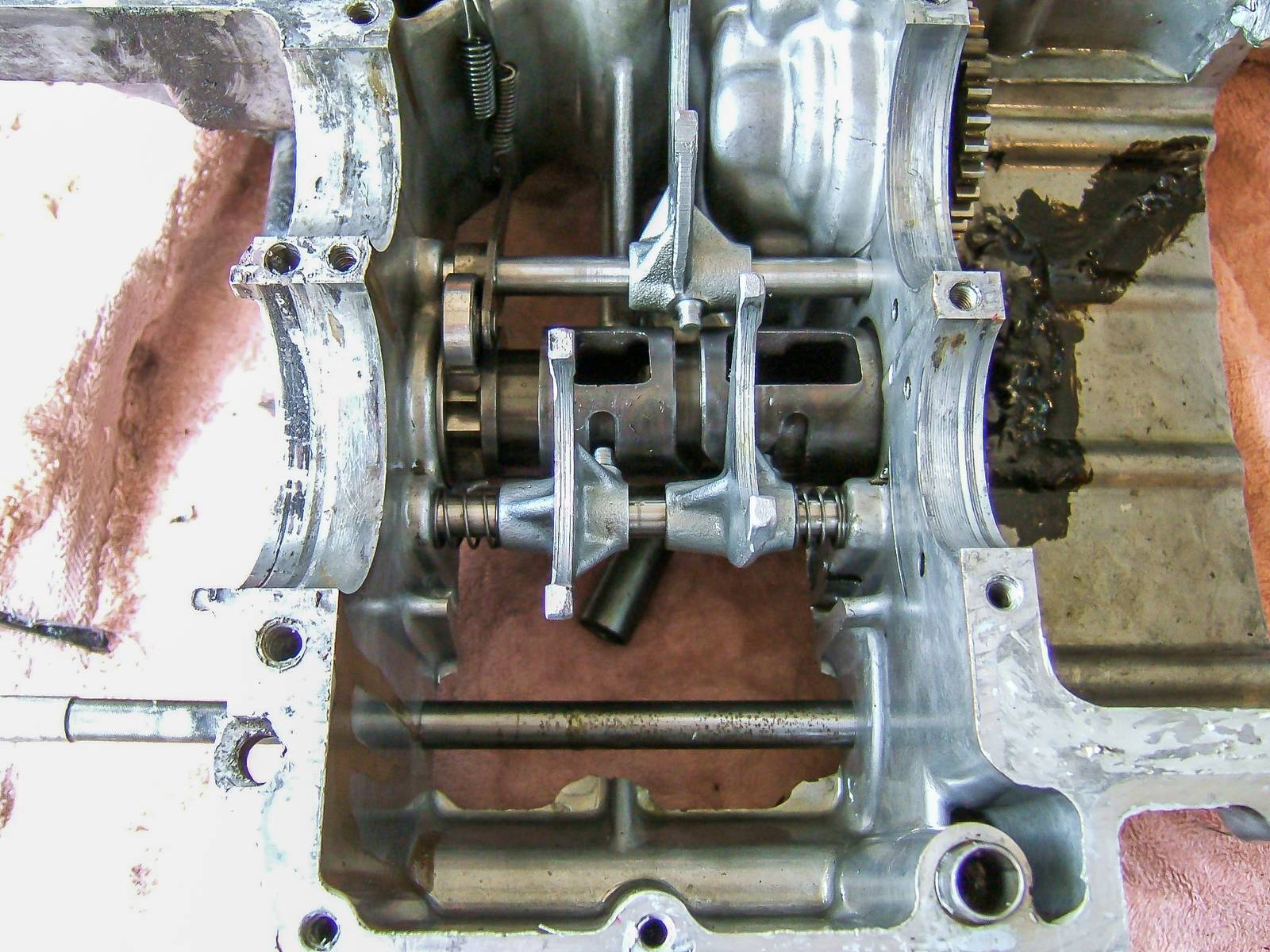
I now see that the forks on shaft No 2 (toward the rear of the engine) are different sizes. Yes - I did not pay close attention during the pull down. The fork on the left of the image is less than half crescent, while the fork on the right is a full crescent.
I've done a lot of searches on here and could not get any clarification. The workshop manual just states "Insert gear shifting fork shaft..." and "At this time, pay attention to the direction of the gear shifting fork". The images in the PDF workshop manual are quite dark which makes it difficult to see.
My (noob) question is, in what order do they go on the shaft? E.G. Half crest on the left or right side of the engine.
Below is an image of the forks
https://postimg.cc/Fkp0WLKr
Cheers and thanks again
Noob question here. It's time to commence the reassembly of my 1980 GS1000G. During the disassembly process I took a lot photos to assist during the reassembly process. BUT - it turns out my images of the transmission gear selector forks could have been taken at better angles.
I now see that the forks on shaft No 2 (toward the rear of the engine) are different sizes. Yes - I did not pay close attention during the pull down. The fork on the left of the image is less than half crescent, while the fork on the right is a full crescent.
I've done a lot of searches on here and could not get any clarification. The workshop manual just states "Insert gear shifting fork shaft..." and "At this time, pay attention to the direction of the gear shifting fork". The images in the PDF workshop manual are quite dark which makes it difficult to see.
My (noob) question is, in what order do they go on the shaft? E.G. Half crest on the left or right side of the engine.
Below is an image of the forks
https://postimg.cc/Fkp0WLKr
Cheers and thanks again