• Required reading for all forum users!!!

    Welcome!
    Register to access the full functionality of the GSResources forum. Until you register and activate your account you will not have full forum access, nor will you be able to post or reply to messages.

    A note to new registrants...
    All new forum registrations must be activated via email before you have full access to the forum.

    A Special Note about Email accounts!
    DO NOT SIGN UP USING hotmail, outlook, gmx, sbcglobal, att, bellsouth or email.com. They delete our forum signup emails.

    A note to old forum members...
    I receive numerous requests from people who can no longer log in because their accounts were deleted. As mentioned in the forum FAQ, user accounts are deleted if you haven't logged in for the past 6 months. If you can't log in, then create a new forum account. If you don't get an error message, then check your email account for an activation message. If you get a message stating that the email address is already in use, then your account still exists so follow the instructions in the forum FAQ for resetting your password.

    Have you forgotten your password or have a new email address? Then read the forum FAQ for details on how to reset it.

    Any email requests for "can't log in anymore" problems or "lost my password" problems will be deleted. Read the forum FAQ and follow the instructions there - that's what we have one for...

  • Returning Visitors

    If you are a returning visitor who never received your confirmation email, then odds are your email provider is blockinig emails from our server. The only thing that can be done to get around this is you will have to try creating another forum account using an email address from another domain.

    If you are a returning visitor to the forum and can't log in using your old forum name and password but used to be able to then chances are your account is deleted. Purges of the databases are done regularly. You will have to create a new forum account and you should be all set.

GS1100E gauge lights no worko

  • Thread starter Thread starter Flaming Chainsaws
  • Start date Start date
F

Flaming Chainsaws

Guest
Actually, it half works. I am stumped :confused:.

The bike is a 1983 Suzuki GS1100E.

I'll explain this as best as I can.

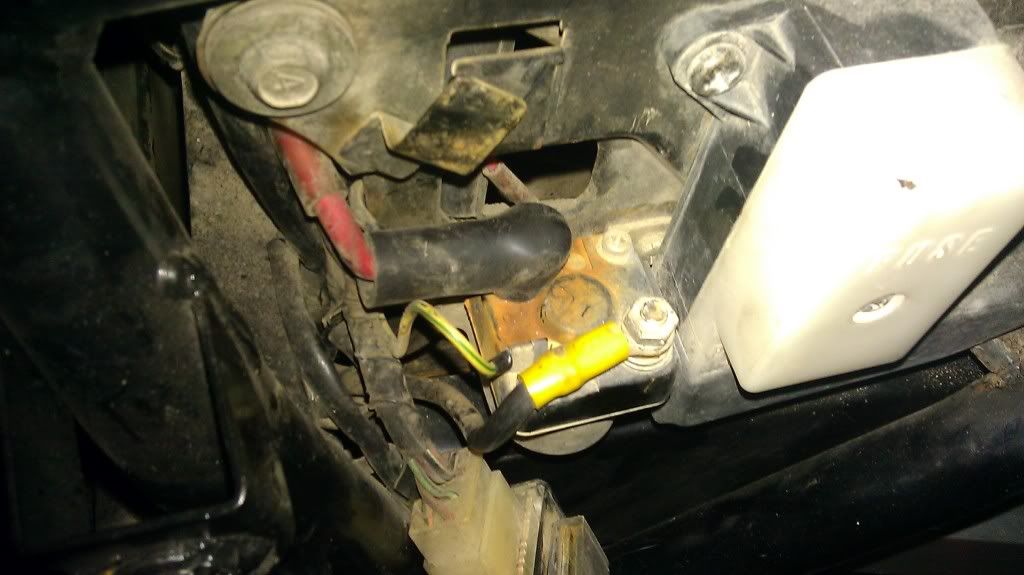
The ground wire from the fuse box leads to the starter solenoid's right mounting bolt. Then another ground wire from the starter solenoid's right bolt leads to the negative battery post.

With the above setup, I can crank the bike over but only the hi-beam light works on the gauge cluster. Nothing else.

If I disconnect that ground wire from the negative battery post, the bike will not crank over (makes sense) but now only the neutral light works. Hi-beam no longer works. What the hell?

What's your take? I can get pictures if needed.
 
IMAG0249.jpg


This is off my 83 E hasn't been touched electric wise.

Have three wires off of the solenoid. y/g wire leads to a bullet connection in a small bundle just by front of battery box. Black is power for the starter. Red is main line to battery +.

Don't have any grounds from the fuse box to the solenoid or from solenoid to battery -


Nic
 
Yeah, mine is just like that but can you take a look at the starter solenoid's right mounting bolt? Are there any wires connected to that? Can you trace them for me if they are?
 
no grounds on right mount bolt. On the left mount there is a ground wire that comes off the main harness (black wire w/thin white stripe).


Branches off the main harness almost directly above the solenoid area.

Nic
 
no grounds on right mount bolt. On the left mount there is a ground wire that comes off the main harness (black wire w/thin white stripe).


Branches off the main harness almost directly above the solenoid area.

Nic
I see.... So someone must have been messing around with the electricals here...

I'm going to take a guess and say that the fuse box should not ground on the starter solenoids bolt but some where else. What am I talking about? Why does the location matter? Man! I hate electricals SOOOO much lol.

I'll be back with pics and info :).
 
It shouldn't really matter. As long as the ground is in contact with bare metal.

In fact, the ground on mine coming out of the main harness to the left mounting bolt may very well be the fuse box ground. It's still taped and wrapped in the main harness but seems to be in the routed the same as the other lines.

After looking at the wiring diagram, the fuse box ground black/white does eventually ground at the solenoid mount bolt (left one although it doesn't really matter which.

Nic
 
Last edited:
OK, I'm back with pictures.

This here was the original setup. The top wire comes from the main wiring harness. The wire on the bottom comes from the R/R. And the last wire is ground for the starter solenoid which connects to negative battery post.
DSCN4135.jpg


I decided to change things up a bit. The R/R's ground is now connected to the negative battery post. The wire from the main harness is now connected to the left starter solenoid bolt and then there is another wire from the main harness which is also connected there.
DSCN4141.jpg


DSCN4140.jpg


Bad pic but you can see it. Only the high beam works and headlight works.
DSCN4142.jpg
 
Now here's the weird part. See that ground wire there? The bottom one.
DSCN4141.jpg


If I remove that ground, then the headlight turns off and the hi-beam light no longer works. But in return, the neutral light now turns on.

If I connect the ground wire back, the neutral light turns off and then the headlight and hi-beam light turns back on. WTF???


I'll also mention that no other lights or electronics work. Tail/brake/license plate light does not work although the bulbs are good. Turn signals do not work but bulbs are good. Only the neutral and hi-beam light work on gauge cluster. Starter works and I have good spark. Why is everything else dead? I triple checked and the wires are connected correctly.
 
Last edited:
Someone once posted that those panel lights are tied into the oil pres switch. Check that funky wire clip and then maybe the light control box connectors under the gas tank.
 
Someone once posted that those panel lights are tied into the oil pres switch. Check that funky wire clip and then maybe the light control box connectors under the gas tank.
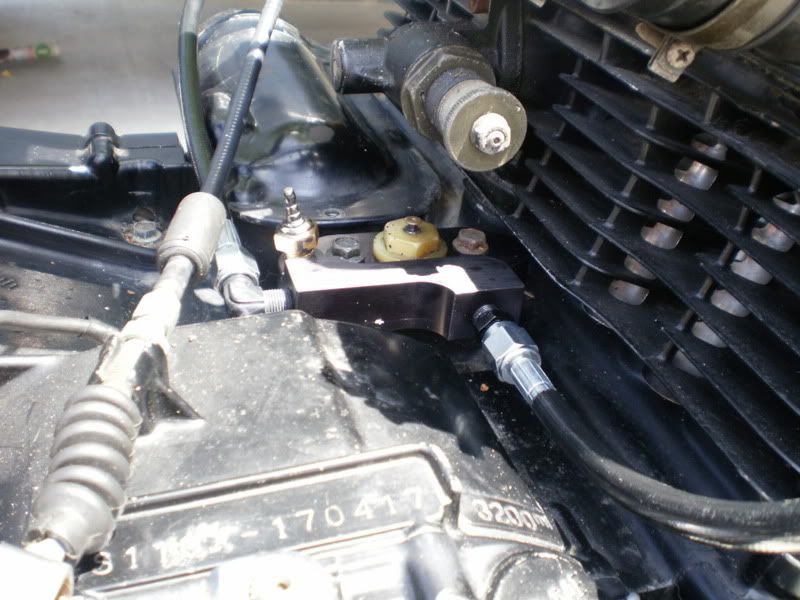
Oil pressure switch? Where is that? If that's the thing that's under the carbs, it's gone now. Been replaced with a top end oiler block.

I will check those boxes under the gas tank.
 
What happened to the wire that went to it ? Better sit down and give the wire diagram a good going over.....:-k.
There is no wire on the oil pressure switch when I replaced it with my top end oiler.
 
I think I found out the problem to why none of my lights work except for the headlight and hi-beam.

This is pulled out straight from the Hayne's GSX/GS1000, 1100 & 1150 4-Valve Fours manual.

The below is on page 174, section 15, paragraph 2.
The check panel is dependant on its supply from the oil pressure switch. If this fails, the check panel will not operate normally.
Now refer to page 54 and look at the last picture, 4.7 c.
DSCN4231.jpg


And now compare that same picture to my oil pressure/temp switch.
DSCN4223.jpg


DSCN4226.jpg


DSCN4227.jpg


DSCN4228.jpg


With the above oil pressure switch, I cannot plug any electrical wire into it. Same thing for my top end oiler. This must be my problem right?
 
Last edited:
What happened to the wire that went to it ? Better sit down and give the wire diagram a good going over.....:-k.

I found the green/yellow wire (oil pressure). I also found the pink wire (oil temp).
DSCN4234.jpg


I plugged the gr/y to the negative and nothing happened. Then I plugged the gr/y into positive and the oil light lit up.
DSCN4235.jpg


Tried the above with the pink wire. Negative did nothing but when I plugged it into positive, the oil temp gauge started twitching. The exact same thing happened with the fuel gauge when I tried it.


So it seems that my electrical problem is because I am missing the oil pressure switch. I want to keep my top end oiler... What do you have to say?
 
Last edited:
Last edited:
Back
Top