• Required reading for all forum users!!!

    Welcome!
    Register to access the full functionality of the GSResources forum. Until you register and activate your account you will not have full forum access, nor will you be able to post or reply to messages.

    A note to new registrants...
    All new forum registrations must be activated via email before you have full access to the forum.

    A Special Note about Email accounts!
    DO NOT SIGN UP USING hotmail, outlook, gmx, sbcglobal, att, bellsouth or email.com. They delete our forum signup emails.

    A note to old forum members...
    I receive numerous requests from people who can no longer log in because their accounts were deleted. As mentioned in the forum FAQ, user accounts are deleted if you haven't logged in for the past 6 months. If you can't log in, then create a new forum account. If you don't get an error message, then check your email account for an activation message. If you get a message stating that the email address is already in use, then your account still exists so follow the instructions in the forum FAQ for resetting your password.

    Have you forgotten your password or have a new email address? Then read the forum FAQ for details on how to reset it.

    Any email requests for "can't log in anymore" problems or "lost my password" problems will be deleted. Read the forum FAQ and follow the instructions there - that's what we have one for...

  • Returning Visitors

    If you are a returning visitor who never received your confirmation email, then odds are your email provider is blockinig emails from our server. The only thing that can be done to get around this is you will have to try creating another forum account using an email address from another domain.

    If you are a returning visitor to the forum and can't log in using your old forum name and password but used to be able to then chances are your account is deleted. Purges of the databases are done regularly. You will have to create a new forum account and you should be all set.

Mirror Adjustment Nut

  • Thread starter Thread starter Kruder
  • Start date Start date
K

Kruder

Guest
Hey Gang.

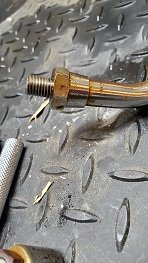
Are the adjustment nuts on the mirror stems supposed to spin loose and separate from the mirror stem or are they supposed to spin together as one piece? It looks like they're suppose to be able to spin loose but I don't want to break something and wish I'd asked ahead of time, ya know?

I'd post a picture to illustrate what I'm talking about but I've been following the FAQ directions and I cannot upload any images, despite being well-under the size limitation. :apologetic:
 
yeah otherwise they won't adjust, you'll be stuck with the position where they end up tight. I'd hit it with some penetrating spray and tap it a bit, and if that didn't work I'd soak it in something to de rust maybe - vinegar or muriatic acid and water.
 
Posting (hi quality and/or multiple) photos on the forum is somewhat tricky. You need to have pics hosted on a picture hosting website like flickr or Imgur. You need to copy the BBcode of the image, then paste that into the post. I have written instructions for using imgur. Follow the link in my signature.
 
Oh it's a simple process - take pic on phone, wait for it to sync to Google photos or email to myself, go to PC and download, log into Imgur, upload it, select it, resize, apply/save, get BBCode URL and paste into the thread :p It'd be cool if Imgur would import from Google Photos, or Google Photos added a BB code link. I don't think those capabilities exist. Thanks for your instructions BTW Rich.
 
I've actually gotten a lot faster with using just my phone most times to post pics.

1.Take pic
2. Open Imgur app on phone and upload pic
3. Open safari where I already have a tab open to the Imgur full site.
4. Hit refresh. "click" on the pic that was just added.
5. Pinch and scroll around to get the the image size and click it so it's green.
6. Click the blue COPY button under BBCode.
7. Go to the Safari tab I already have open to the thread I want to post the pic in.
8. Add,Reply to thread. "click" where I want the pic in the post, a black bar shows up with the option to paste. select paste.
9. Post Reply

I don't know what could be simpler :rolleyes:
 
OOOOOH, that explains it, now I see why I never learned how to put any pictures on a computer.
 
yeah otherwise they won't adjust, you'll be stuck with the position where they end up tight. I'd hit it with some penetrating spray and tap it a bit, and if that didn't work I'd soak it in something to de rust maybe - vinegar or muriatic acid and water.


Yeah, that's what I figured. I've got some PB Blaster soaking on it, again, with hope that will help break something loose. I have the mirrors standing upright and the PB is just sitting in there so I'm hoping this works.

I don't have any muriatic acid but plenty of white vinegar. I'll jump off that bridge when I get to it. I'll probably order new vibration cushions as these are pretty rotted out.
 
Not quite. I don?t think you got the BBCode. Should look like this:

4iBROTp.jpg
 
Ok, next attempt. Same picture.

Might as well figure this out, I'm going to need this later.

GqmclRgs.jpg
 
Now you?re getting it. As they suggest, any of the ?square? size selections crop your image somewhat arbitrarily to make it square. The other sizes don?t crop the original image. I find that most of my pics present well in the Forum at large thumbnail or giant thumbnail size.
 
Back
Top