• This forum allows conversation on non-controversial topics, therefore no politics or religion. "The Campfire" is an area meant for casual, civil discussions. Deliberate anti-social activity including personal insults, profanity, pornography, racism, threats and purposely inflammatory posts may result in suspension of forum access or possibly a permanent ban from GSR.

    The words insight and incite are pronounced the same. But one of them will get you banned and the other will not. Before hitting the Submit button be certain which of the two better describes your post.

  • Required reading for all forum users!!!

    Welcome!
    Register to access the full functionality of the GSResources forum. Until you register and activate your account you will not have full forum access, nor will you be able to post or reply to messages.

    A note to new registrants...
    All new forum registrations must be activated via email before you have full access to the forum.

    A Special Note about Email accounts!
    DO NOT SIGN UP USING hotmail, outlook, gmx, sbcglobal, att, bellsouth or email.com. They delete our forum signup emails.

    A note to old forum members...
    I receive numerous requests from people who can no longer log in because their accounts were deleted. As mentioned in the forum FAQ, user accounts are deleted if you haven't logged in for the past 6 months. If you can't log in, then create a new forum account. If you don't get an error message, then check your email account for an activation message. If you get a message stating that the email address is already in use, then your account still exists so follow the instructions in the forum FAQ for resetting your password.

    Have you forgotten your password or have a new email address? Then read the forum FAQ for details on how to reset it.

    Any email requests for "can't log in anymore" problems or "lost my password" problems will be deleted. Read the forum FAQ and follow the instructions there - that's what we have one for...

  • Returning Visitors

    If you are a returning visitor who never received your confirmation email, then odds are your email provider is blockinig emails from our server. The only thing that can be done to get around this is you will have to try creating another forum account using an email address from another domain.

    If you are a returning visitor to the forum and can't log in using your old forum name and password but used to be able to then chances are your account is deleted. Purges of the databases are done regularly. You will have to create a new forum account and you should be all set.

Computer Help

bccap

Forum Sage
Past Site Supporter
I know there are some guys around here that are pretty knowledgeable about computers. Sandy and Cipher come to mind but I know there are others ..... First of all though my computer is getting a little long in the tooth I like it . It has a 3.80 ghz processor 8 gigs of ram and a 1 terabyte hard drive { unfortunately not SSD } ..... What I like is that it has a camera SD card reader on the front and a DVD drive built in which most new computers do not have .....However the open close button on the DVD drive no longer works. I can still use it by going into Control Panel and selecting the drive and using the " eject " option to open it ...... It is also crashing every 4 or 5 days with the message " Power supply surges detected during the previous power on " where it reboots into the BIOS settings . I hard reboot using the power button and everything is fine for another 4 or 5 days. I googled it and apparently it is a known issue with Asus motherboards that can be solved by going into the BIOS and turning the message off ..... I just haven't done it yet ...... I also use Classic Shell because my last version of Windows I found difficult to use. Classic Shell makes everything look like Windows 7 { Windows 10 is installed } ......

Plan A is to buy a new computer,monitor, and keyboard . Place it next to my old computer and slowly { because I'm a computer idiot } set up the new one until it has everything my old one has in it functioning .....

What I'd like others opinions on

1} At the end of this post the model computer I am interested in is listed. Would like others opinions on whether I should buy it or another model ? My reasons for choosing this one is that it has Windows 11 { which I will need after October } an SSD hard drive, 32 gigs of ram, and moderately faster cpu than I have now . But if someone has a better recommendation I'm all ears .....

2} I use Firefox for a browser ...How can i get all my bookmarks and saved passwords over to the new computer ?

3 } Likewise how can I get my Thunderbird address book over to the new computer ? .....

4} I also have paid versions of Malware Bytes and Ccleaner . How do I get them over to the new computer .....

5} How do I get all my documents and pictures over to the new computer ?

I'll add any further questions I have once the new computer arrives and I begin the setup process . First job will to put Open Shell in so it looks like Windows 7 . Then the transfers can begin ..... Please address any comments as if you are talking to a computer idiot because you are ....

This is the computer I am thinking of buying. Many thanks to any advice I get .....

https://www.amazon.ca/gp/product/B0CKZFP64Z/ref=ox_sc_act_image_4?smid=A3RPI7T9S6G20W&th=1
 
Last edited:
Good choice on going with a refurb unit. These are usually commercial grade lease return computers and much more robust in build than the usual consumer grade stuff you find out there. I just upgraded my desktop with an HP ProDesktop with pretty much the same specs as thie Dell you're looking at. Did you on the Staples website at refurhished desktops? On the road right now but for a start install a free utility called Belarc Advisor on your current PC, run it then print out the results. It will give you complete inventory of software with register numbers/keys of everything on yuor PC as well as break down of the hardware configuration. This you can review and only install what really need on the new one.

As for transferring data that would depend on how much you need to move over. Choices are anything from USB sticks to external backup drives or network cable. I would not use automated transfer software for programs and data but do what is called a clean install. Keep us posted and we can walk you through it
 
Good choice on going with a refurb unit. These are usually commercial grade lease return computers and much more robust in build than the usual consumer grade stuff you find out there. I just upgraded my desktop with an HP ProDesktop with pretty much the same specs as thie Dell you're looking at. Did you on the Staples website at refurhished desktops? On the road right now but for a start install a free utility called Belarc Advisor on your current PC, run it then print out the results. It will give you complete inventory of software with register numbers/keys of everything on yuor PC as well as break down of the hardware configuration. This you can review and only install what really need on the new one.

As for transferring data that would depend on how much you need to move over. Choices are anything from USB sticks to external backup drives or network cable. I would not use automated transfer software for programs and data but do what is called a clean install. Keep us posted and we can walk you through it

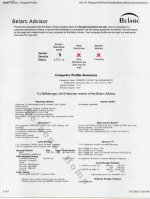
Thanks Sandy. I'll go ahead and order it. I downloaded Belarc Advisor and ran it. Here is a scan of the first page. It appears my virus protection needs upgrading as well as a couple of security updates. If I click on those options will Belarc Advisor fix them ?

belarc scan.jpg
 
Thanks Sandy. I'll go ahead and order it. I downloaded Belarc Advisor and ran it. Here is a scan of the first page. It appears my virus protection needs upgrading as well as a couple of security updates. If I click on those options will Belarc Advisor fix them

If you're this close to upgrading wouldn't bother updating the virus definitions. I would pull that AMD video card out though unless you are giving your computer to someone else to use and there's no onboard video. If you're still doing Photoshop stuff, particularly if you're using some of the new AI based advance features the onboard Intel 630 graphics won’t handle it. Most of the older basic features will work if you set max RAM usage in the BIOS but the other stuff will choke.
 
If you're this close to upgrading wouldn't bother updating the virus definitions. I would pull that AMD video card out though unless you are giving your computer to someone else to use and there's no onboard video. If you're still doing Photoshop stuff, particularly if you're using some of the new AI based advance features the onboard Intel 630 graphics won’t handle it. Most of the older basic features will work if you set max RAM usage in the BIOS but the other stuff will choke.

Aargh ! The damn thing just crashed twice with that " Power Surge " message . I'll admit I'm a little intimidated by going into the BIOS even if the instructions I printed out are pretty easy . A couple of more times and I'll have to do it ..... My version of Photoshop is 6 . And it's a cracked version .... I'll see if I can remember how I did it when I set up the new computer . I don't mind paying for Photoshop but I do very much mind " renting " it which is apparently the only way now ..... Photoshop Elements I can buy for { $140 for three years.} I suspect it is better than my old Photoshop 6 version ....I'll have to look into how inferior to Photoshop it is . The new Photoshop is $360 a year ......
 
Hi bccap

Dell is good computer platform. I worked as an I.T. tech at an Australian science and research organisation that transitioned solely to Dell desktop and server computers. Dell support is pretty good also.

A couple of things to note before transitioning to a new computer.

1 - BACK UP all of your data to an external drive or high capacity USB drive. When it comes to the world of computers, your data is the most valuable item. Computers and software packages can be replaced, lost documents and photographs can't.

2 - Consider freeware programs like Gnu Image Manipulation Program (G.I.M.P.) as a replacement for Photoshop. I used to run Photoshop, but now I only use G.I.M.P. for image manipulation. Yes, the look and feel may be different but the commands within the package are universal and you don't have to pay an annual rental fee.

See https://www.gimp.org/downloads/

If you use any movie editing software, you could also try kdenlive. See https://kdenlive.org/

Same applies to audio editing software. If you have a requirement to edit sound files, Audacity is a simple yet powerful audio editing package.

See https://www.audacityteam.org/

Office suite. If you need an Office Suite, consider LibreOffice. Again the look and feel is a little different, but it's functionality is every bit as good as Microsoft Office and it get regular updates. (Also free)

See https://www.libreoffice.org/

I use all of these software packages and will never pay for software packages again.

3 - Thunderbird should have a directory (Folder) that stores all your Email, Address Book info and Calendar located on you C: drive. You should be able to find the folder on your old computer at C:\Users\UserName\AppData\Roaming\Thunderbird\Prof iles. (UserName being your login name).
You can copy and paste the Thunderbird folder and transfer it to your new computer.

4 - Browser choice. Firefox is good, Brave Browser is better, way more secure and blocks all kinds of useless popups and adverts. Brave browser does not track your online activity and share with third parties.

Cheers​
 
Here's what I'm hearing. You want an OS upgrade, better long term storage and the ability to use your CD player. Seems to me the easiest way to transition to a new machine would be to use an external SSD or USB flash drive and an external CD player which should be dirt cheap. Transfer everything over to external storage, get your new machine (or upgrade your current one's OS) and you're done!
 
Hi bccap

Dell is good computer platform. I worked as an I.T. tech at an Australian science and research organisation that transitioned solely to Dell desktop and server computers. Dell support is pretty good also.

A couple of things to note before transitioning to a new computer.

1 - BACK UP all of your data to an external drive or high capacity USB drive. When it comes to the world of computers, your data is the most valuable item. Computers and software packages can be replaced, lost documents and photographs can't.

2 - Consider freeware programs like Gnu Image Manipulation Program (G.I.M.P.) as a replacement for Photoshop. I used to run Photoshop, but now I only use G.I.M.P. for image manipulation. Yes, the look and feel may be different but the commands within the package are universal and you don't have to pay an annual rental fee.

See https://www.gimp.org/downloads/

If you use any movie editing software, you could also try kdenlive. See https://kdenlive.org/

Same applies to audio editing software. If you have a requirement to edit sound files, Audacity is a simple yet powerful audio editing package.

See https://www.audacityteam.org/

Office suite. If you need an Office Suite, consider LibreOffice. Again the look and feel is a little different, but it's functionality is every bit as good as Microsoft Office and it get regular updates. (Also free)

See https://www.libreoffice.org/

I use all of these software packages and will never pay for software packages again.

3 - Thunderbird should have a directory (Folder) that stores all your Email, Address Book info and Calendar located on you C: drive. You should be able to find the folder on your old computer at C:\Users\UserName\AppData\Roaming\Thunderbird\Prof iles. (UserName being your login name).
You can copy and paste the Thunderbird folder and transfer it to your new computer.

4 - Browser choice. Firefox is good, Brave Browser is better, way more secure and blocks all kinds of useless popups and adverts. Brave browser does not track your online activity and share with third parties.

Cheers​

Thanks Syd . Both you and Sandy seem to approve of my choice for a computer so I pulled the trigger this morning . Added a monitor with camera for those family Christmas Zoom calls and Facebook calls to my friends in India .... So the 2 computers will sit side by side until everything on the new one is up and running. I thought Microsoft Office was included with windows because the last time my old computer was in the repair shop they installed Windows 10 and Office 2010 magically appeared when I booted up . This is apparently not the case . They must have installed it . I don't know if I can get it over to the new computer without an installation program ..... I'll check out your suggestion libreoffice. I did find a copy of Office 2021 for $69.95 { one time purchase } at Bestbuy NO WAY I'M GOING FOR AN ANNUAL SUBSCRIPTION. THEY EITHER SELL IT TO ME OR THEY ARE OUT .....

As for Gimp I did try it last time and the interface was so different from Photoshop I never did figure it out . So if my memory will allow me { I'm old that's a coin toss } I'll either install my pirated version of Photoshop 6 { if I can remember how } or spring for Elements which though I can't get around the subscription feature is reasonbly priced at $140 for three years ..... For me Photoshop is about correcting existing photographs and making funny masking projects .....

I've been typing up a plan of attack.

1} Get Open Shell installed so it looks like Windows 7

2} Get it on line

3} transfer my existing bookmarks to Firefox on the new computer . Which is apparently easy with Mozilla account. I opened a Mozilla account yesterday .

4} Get my existing Thunderbird email addresses over to the new computer which I think I have figured out how . And get my existing 3 email accounts working. This will be a little more difficult because when Telus switched to Google they did something weird in the protocols. I solved it last time but can't remember what I did .....

Once I'm on line with internet and email I can relax and proceed slowly with file transfers and program installations .....

Lab3 .... I have a " My passport 1 Terabyte SSD " I will be using for file transfers...... The new machine has a built in DVD drawer so no problem there ....

 
Just transferred my Itunes library onto my 1 terabyte portable drive . Took a couple of hours . Didn't think it was that big but it was 201 gigs . There's an old backup file on my desktop they used last time they replaced my hard drive . I'll transfer that too and go through it when I do the new computer. 190 gigs in that one .....
 
Computer, monitor, a camera card reader, and a bunch of cables arrived today . My cleaning person dug a hole on my desk to put the new computer alongside my old one until the transfer is complete . Don't think I'll tackle the project for a couple of days. I hope the computer is alright as the way I knew it had arrived was hearing it bounce of the floor outside my door ......

I have been slowly researching data transfer and feel I've got at least a handle on it. I will be posting up any problems I run into . My biggest fear is getting my Telus email working as it was a problem on the last computer and I can't remember what I did to fix it . { Something about outgoing SMTP settings. I just can't remember how I fixed it } But I did research Firefox Thunderbird and it appears if you transfer the " profile " from one computer to the other all the settings go with it ...... Hopefully that is accurate ...... I've already done that to an external drive ....

computer 5.jpg

 
Relax bccap, betting you'll get it figured out pretty quick. If you run into trouble contact me, I'll "TRY" to walk you through it....:stupid::stupid::stupid::stupid::stupid:
 
Relax bccap, betting you'll get it figured out pretty quick. If you run into trouble contact me, I'll "TRY" to walk you through it....:stupid::stupid::stupid::stupid::stupid:

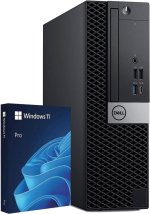
Yeah I'll admit I find the task a bit daunting . Everything is now out of the boxes and plugged into each other but no power is plugged in yet . First task will be to boot up and use the Shift-F10 keys to get a command prompt to type in START MS-CH:LOCALONLY which will bypass the Microsoft account requirement and just leave a user account with no password ....Which is what I want . I don't want to be logging in every time I want change something ..... That's the plan for tomorrow ...... A question though ...... As you can see from the photo the DVD drive is sideways . Do I have to turn the computer on it's side or does it load okay sideways ?

71d76s4MidL._AC_SL1500_.jpg
 
Yeah I'll admit I find the task a bit daunting . Everything is now out of the boxes and plugged into each other but no power is plugged in yet . First task will be to boot up and use the Shift-F10 keys to get a command prompt to type in START MS-CH:LOCALONLY which will bypass the Microsoft account requirement and just leave a user account with no password ....Which is what I want . I don't want to be logging in every time I want change something ..... That's the plan for tomorrow ...... A question though ...... As you can see from the photo the DVD drive is sideways . Do I have to turn the computer on it's side or does it load okay sideways ?


IIRC correctly you can activate your Windows out having to use a Microsoft account by simply chosing the set as a work, school or domain account button rather than a personal account on the first or second screen. That allows to you bypass/skip the Microsoft account requirement. The DVD will work vertically, there should be little tabs on the drawer that keep the DVD from falling out. However, I think you will still need a password for your user account or set a pin number
 
Last edited:
IIRC correctly you can activate your Windows out having to use a Microsoft account by simply chosing the set as a work, school or domain account button rather than a personal account on the first or second screen. That allows to you bypass/skip the Microsoft account requirement. The DVD will work vertically, there should be little tabs on the drawer that keep the DVD from falling out. However, I think you will still need a password for your user account or set a pin number

This is what I was planning on doing . It looks super easy. What do you think ?

 
Looks like Windows 11 is preinstalled and the account's name is " Dell " . I'm guessing it was set up without a Microsoft account which is what I want . I had been a bit worried because of the way I had found out it was delivered { hearing a loud thud outside my door } but everything appears working . Just working on installing " open shell " so it looks like Windows 7 which is familiar to me ...... Going to make this a slow process so I'll have lots of questions ...... One of which is how to get my personal banking information off the old one so I can pass it on to a friend ......
 
I have to admit that reading about someone else going through this process is a lot more enjoyable than doing it myself. I am SO glad we have an IT group in our department, because most of our upgrades would never get done without them.
 
First wrinkle ..... The new keyboard doesn't work .... It was a cheap wired one anyway and my old bluetooth keyboard works fine on the new computer but I wanted to use youtube " how to " videos to jump back and forth between computers and not have to unplug and replug into the new one. Project for this afternoon, off to London Drugs to buy a $20 temporary keyboard .......
 
Well day 1 was fun .... Got Open Shell installed and downloaded Firefox and got all my bookmarks over from syncing the two computers .....Got a bunch of tabs loaded but ran into a snag when I tried to open my bank and stock accounts. Apparently when Telus updated me to fibre optics a few months they also installed that junk call stopper that makes you dial a number to get through .... This made it so when I went to log on to my bank and stock accounts on the new computer they wanted to give me a one time code via telephone. Of course a robo call isn't going to get past the call screener . That meant an hour on hold with Telus support to get that feature removed ..... So it's back to getting those Amazon scam calls I guess .....

She also told me I can't use Thunderbird on my Telus email anymore . { since the Gmail migration } I don't think she is correct because I'm using it now on the old computer. I just have to figure out those pop and imap settings like I did before ......
 
Well day 1 was fun .... Got Open Shell installed and downloaded Firefox and got all my bookmarks over from syncing the two computers .....Got a bunch of tabs loaded but ran into a snag when I tried to open my bank and stock accounts. Apparently when Telus updated me to fibre optics a few months they also installed that junk call stopper that makes you dial a number to get through .... This made it so when I went to log on to my bank and stock accounts on the new computer they wanted to give me a one time code via telephone. Of course a robo call isn't going to get past the call screener . That meant an hour on hold with Telus support to get that feature removed ..... So it's back to getting those Amazon scam calls I guess .....

She also told me I can't use Thunderbird on my Telus email anymore . { since the Gmail migration } I don't think she is correct because I'm using it now on the old computer. I just have to figure out those pop and imap settings like I did before ......

Just log into your Telus account and somewhere in your account settings or profile under features and add-ons there should be a checkbox to turn on or off the feature. As for Thunderbird just install and input your email address and password when setting it up and it should just auto populate the require info, it least it did with mine when I set it up with imap and gmail account which Telus is now using. If that doesn't work just go into Thunderbird on your old computer and under Tools > Account Setting > Server Settings and also Outgoing Server and record the info you need or take picture of the screen.
 
Back
Top