• Required reading for all forum users!!!

    Welcome!
    Register to access the full functionality of the GSResources forum. Until you register and activate your account you will not have full forum access, nor will you be able to post or reply to messages.

    A note to new registrants...
    All new forum registrations must be activated via email before you have full access to the forum.

    A Special Note about Email accounts!
    DO NOT SIGN UP USING hotmail, outlook, gmx, sbcglobal, att, bellsouth or email.com. They delete our forum signup emails.

    A note to old forum members...
    I receive numerous requests from people who can no longer log in because their accounts were deleted. As mentioned in the forum FAQ, user accounts are deleted if you haven't logged in for the past 6 months. If you can't log in, then create a new forum account. If you don't get an error message, then check your email account for an activation message. If you get a message stating that the email address is already in use, then your account still exists so follow the instructions in the forum FAQ for resetting your password.

    Have you forgotten your password or have a new email address? Then read the forum FAQ for details on how to reset it.

    Any email requests for "can't log in anymore" problems or "lost my password" problems will be deleted. Read the forum FAQ and follow the instructions there - that's what we have one for...

  • Returning Visitors

    If you are a returning visitor who never received your confirmation email, then odds are your email provider is blockinig emails from our server. The only thing that can be done to get around this is you will have to try creating another forum account using an email address from another domain.

    If you are a returning visitor to the forum and can't log in using your old forum name and password but used to be able to then chances are your account is deleted. Purges of the databases are done regularly. You will have to create a new forum account and you should be all set.

charging system up grade

  • Thread starter Thread starter not a biker
  • Start date Start date
My ass!
Lots of Suzukis here, no failures.
Maybe it's just me.

GOD!!! Your luck is better than mine! I even managed to eat up a Dunnaege R/R.
I think my stator cooked it before I could figure out it was bad too... Ended up with a freebie from a local guy who used to work on Gold Wings... Perfect now!
 
Sense Wire Explanation, please

Sense Wire Explanation, please

Looks to be the same part as the 1000RR. Hooks up the same as your GS regulator. Three yellow wires from the stator, red for positive, and green for ground. Also no sensor wire to hook up.

I have seen some newer Honda CBR R&R listed on EBay with what appears to be three yellow wires, 2 Red wires & 2 green wires. Are the extra red & green wires the sense wires other have mentioned? I could use an explanation regarding their function and wiring into the GS harness.

Thanks
 
srsupertrap,

The three yellow wires connect to the three wires from the stator.
then connect the two reds together and connect them to the wire that was going to the fuse box (usually a red wire also).
connect the two green wires together and connect them to a GOOD ground. some suggest connecting the green ground wires to the negative post of the battery. I don't do it that way, I just find two clean grounds to connect the green wires to.

The sense wire (if used) will usually black or brown.

using a separate sense wire is just one of many methods used to read the battery voltage level, so the R/R can properly set the voltage output of the charging system.

makes "sense" now?
 
Last edited:
Rustybronco,

Your explanation made a lot of sense to me. Last question, if you were to install a Honda CBR R&R with a back or brown sense wire in one of our GS's would you hook it up the sense wire to the Battery positive terminal or leave it disconnected?

Thanks for making sense of this . . . hitting the road now
 
Hi,

The sense wire gets connected to any 12v source that is active once the ignition switch is turned on. Most often this is connected to the rear brake light switch, but there are other places.


Thank you for your indulgence,

BassCliff
 
Rustybronco,
would you hook it up the sense wire to the Battery positive terminal or leave it disconnected?

Thanks for making sense of this . . . hitting the road now
If you leave the sense wire disconnected, the R/R wont charge properly (the charging system voltage will be all over the place).
you must connect it the way basscliff suggested.

make sure the wire you connect it to, has the same voltage on it (or within about .2 volts), as the measured battery voltage. you may need to clean all the connections going to the source of the voltage "tap" you connect the sense wire to, in order to obtain proper a voltage signal for the R/R.

a wiring diagram will help greatly to find those connections.
the diagram is found at the back of the owners manual, or basscliff has some links to them. :)

making a little more "sense" now?
 
Last edited:
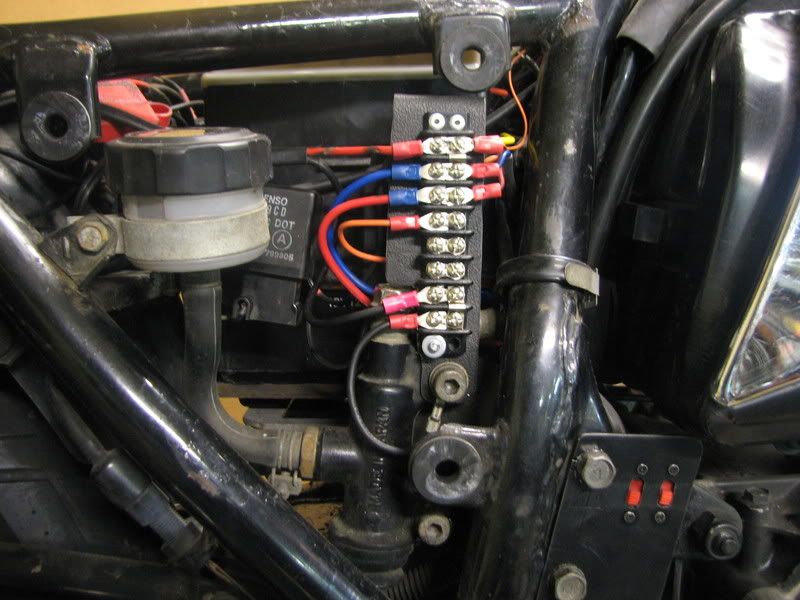
I have added several accessories to my wife's '82 850L, so I fabricated a terminal strip to power them. Power to the strip comes from the battery, through a relay that is triggered by a circuit that is controlled by the ignition switch. Sounds convoluted, but works very well, the voltage at the terminal switch is exactly what it is at the battery, so that is where I hooked up the sense wire.

I only got a picture during the installation, not after it was done, but you get the idea. The top two rows are connected together and are fed by the relay via the blue wire. The other wires there feed the sense wire, CB radio, volt meter, GPS and tail light (keeps the tail light from dimming when the brakes are applied). The third row is fed by the red wire, which is the NC terminal on the relay (87a) and is live when the ignition key is OFF. This is to allow decorative LEDs to be turned on when the bike is off. Wires going to the LEDs were added after the picture was taken. The fourth row comes from the two switches in the lower right corner of the picture, which determine whether the LEDs are on and whether they come on with the bike on or off. The bottom two rows are all the ground wires for all the accessories.

A little fabrication work like this really keeps down the rat's nest usually seen under the covers. :D

IMG_4812.jpg


.
 
Being that i am not having problems i think i will make a new groung cable from the r&r to a good ground and make sure all my connections are clean and tight.
 
Back
Top