• Required reading for all forum users!!!

    Welcome!
    Register to access the full functionality of the GSResources forum. Until you register and activate your account you will not have full forum access, nor will you be able to post or reply to messages.

    A note to new registrants...
    All new forum registrations must be activated via email before you have full access to the forum.

    A Special Note about Email accounts!
    DO NOT SIGN UP USING hotmail, outlook, gmx, sbcglobal, att, bellsouth or email.com. They delete our forum signup emails.

    A note to old forum members...
    I receive numerous requests from people who can no longer log in because their accounts were deleted. As mentioned in the forum FAQ, user accounts are deleted if you haven't logged in for the past 6 months. If you can't log in, then create a new forum account. If you don't get an error message, then check your email account for an activation message. If you get a message stating that the email address is already in use, then your account still exists so follow the instructions in the forum FAQ for resetting your password.

    Have you forgotten your password or have a new email address? Then read the forum FAQ for details on how to reset it.

    Any email requests for "can't log in anymore" problems or "lost my password" problems will be deleted. Read the forum FAQ and follow the instructions there - that's what we have one for...

  • Returning Visitors

    If you are a returning visitor who never received your confirmation email, then odds are your email provider is blockinig emails from our server. The only thing that can be done to get around this is you will have to try creating another forum account using an email address from another domain.

    If you are a returning visitor to the forum and can't log in using your old forum name and password but used to be able to then chances are your account is deleted. Purges of the databases are done regularly. You will have to create a new forum account and you should be all set.

Locating the rear wheel

  • Thread starter Thread starter StratJeff
  • Start date Start date
S

StratJeff

Guest
I'm finishing up my 630-530 conversion, and having trouble re-locating the rear wheel. I'm not missing any pieces according to the parts diagrams, but I can't tighten the caliper bracket bolts without "grabbing" the rotor. The caliper doesn't seem to be locating itself correctly.

- I've tried keeping them loose, setting the adjustment screws on the swingarm on both sides to match, and that doesn't help.
- The caliper axle castle nut is loose to allow play while I'm trying, but doesn't seem to make a difference.

I'm including a couple pictures here. I'm also unsure if I'm supposed to have so much clearance on the left side of the bike after the chain- I can't find a picture to compare to.

Thanks everyone for all the help going above/beyond the service manuals.

Pictures: http://imgur.com/a/HwvJn

Jeff
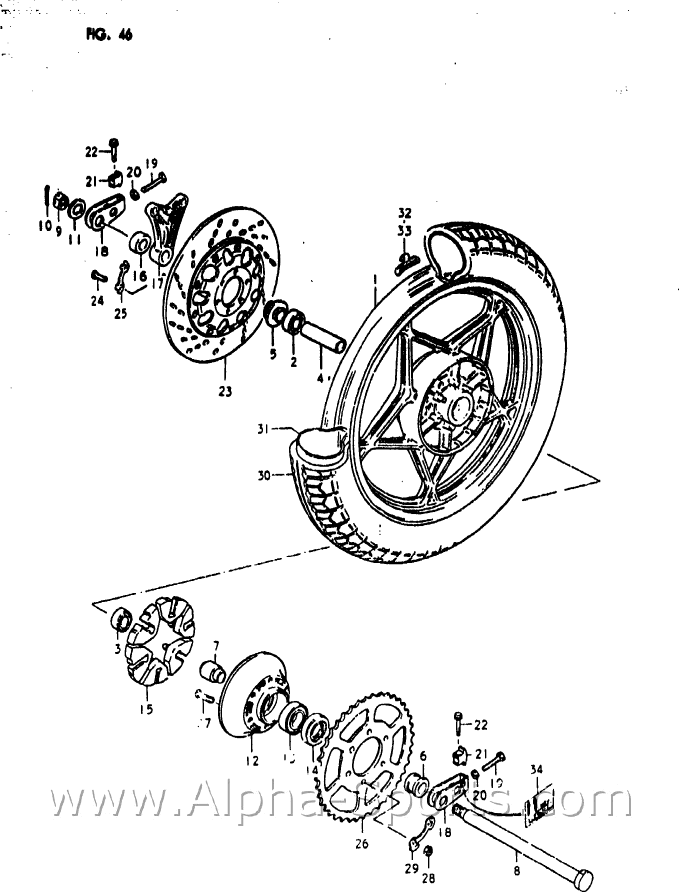
 
naw that wouldhave the opposite impact. strip her down is number 7 on the fiche correctly located?
40.gif
 
I double-checked 2, 5, and 6, but you're right, #7 is buried in the wheel. I'll take it off tomorrow and report back what I find.
 
Morning update: Here's the wheel off the bike, and the associated spacers I've got (in the order they were installed). The wheel hub has never come apart (evidenced by the dirt on left side of hub around bolt heads), so I don't think the problem is internal to the wheel.

Thoughts?

Pictures: http://imgur.com/a/BmtYh
 
In your photo the spacer beside the sprocket is wrong. I think it belongs on the other side and inserts into the seal between the wheel and the caliper. You can see the wear marks on it where it fits into the seal.
 
In your photo the spacer beside the sprocket is wrong. I think it belongs on the other side and inserts into the seal between the wheel and the caliper. You can see the wear marks on it where it fits into the seal.

Isn't that part #6? Or is that #2, and what I've got as 2 is really 16?
 
In your photo the spacer beside the sprocket is wrong. I think it belongs on the other side and inserts into the seal between the wheel and the caliper. You can see the wear marks on it where it fits into the seal.

That's what it looks like. Next time take pictures of everything as you go.
 
Alright, I've made one change- the thick washer #16 was inside the caliper V-mount, instead of outside. I've made that correction, but the wheel *still* does not spin freely without the rotors grabbing.

I made sure to leave the axle nut loose while I adjusted each side's adjustment screws to make sure the wheel is straight, and the first time I did that, the wheel was indeed spinning free. However, as soon as I started to tighten the castle nut, the rotor immediately got pinched. It's just not centered in the caliper, and I'm reaching wits-end on what I'm missing.

Here's a current picture: https://imgur.com/a/ryNGk
 
This is all the info u SHOULD need....


Also take the sprocket carrier off and double check if the bolts are sitting correctly INSIDE the carrier. Bolt the sprocket up to it while its apart. Bolts do fall inside it a little
 
Last edited:
That third piece from the left (silver)- that's #7 on the parts diagram, and lives inside the wheel hub, correct? The only thing visible from the left side of my wheel is the bearing #14, and my double-flanged spacer (2nd from left in your picture) fits snugly into this bearing. The right side is exactly as you have shown.
 
Probably not Cipher- the left pad isn't contacting the rotor at all, so there's plenty of room. The rotor is right up against the caliper itself.
 
That third piece from the left (silver)- that's #7 on the parts diagram, and lives inside the wheel hub, correct? The only thing visible from the left side of my wheel is the bearing #14, and my double-flanged spacer (2nd from left in your picture) fits snugly into this bearing. The right side is exactly as you have shown.

That wheel hub as you say, the correct term is sprocket carrier. and yes that stepped spacer sits inside it and into the large bearing. The same area where you should be looking to see it those sprocket bolts have fallen out of the slot they sit in. Also push ure caliper pistons all the way back in. then mount the wheel them pump the brake pedal to get pressure again. Seems those outer pistons are holding the caliper to the right, causing friction.
 
Last edited:
Why do you keep asking about the sprocket bolts? They do naturally want to fall back in to the carrier, and I had to lean the wheel over and lightly tap to make sure they extended. Then I put the nuts on all 6 and torqued to spec- it was pretty simple.

I'll play around with the caliper pistons tomorrow, and see if the brake will "self-align" once it gets some pressure. Not sure though- the caliper is *really* pinching the rotor, there's no wiggle at all to it.
 
Playing with it more today- the pistons were definitely full out, it took a couple pumps to get them to squeeze.

I was able to get the tire rotating by hand, but as soon as I tightened the axle castle nut, the system locks up. I could keep it loose and cotter pin it, but I'm pretty sure that's not safe. I'll never be able to get to torque specs on it without locking up the wheel.

It looks like I need some additional spacer between the #5 and #17, to align the caliper slightly more to the right.

I'm missing some great riding weather :(

If anyone else with an -E could share some pictures of what theirs looks like fully assembled, that would be really helpful!

EDIT: I found these old pictures of another bike, and my setup is *exactly* the same (except I do have the caliper bracket in place): http://www.thegsresources.com/_foru...el-Assembly-Slack-78-750&highlight=rear+wheel
 
Last edited:
Back
Top