• Required reading for all forum users!!!

    Welcome!
    Register to access the full functionality of the GSResources forum. Until you register and activate your account you will not have full forum access, nor will you be able to post or reply to messages.

    A note to new registrants...
    All new forum registrations must be activated via email before you have full access to the forum.

    A Special Note about Email accounts!
    DO NOT SIGN UP USING hotmail, outlook, gmx, sbcglobal, att, bellsouth or email.com. They delete our forum signup emails.

    A note to old forum members...
    I receive numerous requests from people who can no longer log in because their accounts were deleted. As mentioned in the forum FAQ, user accounts are deleted if you haven't logged in for the past 6 months. If you can't log in, then create a new forum account. If you don't get an error message, then check your email account for an activation message. If you get a message stating that the email address is already in use, then your account still exists so follow the instructions in the forum FAQ for resetting your password.

    Have you forgotten your password or have a new email address? Then read the forum FAQ for details on how to reset it.

    Any email requests for "can't log in anymore" problems or "lost my password" problems will be deleted. Read the forum FAQ and follow the instructions there - that's what we have one for...

  • Returning Visitors

    If you are a returning visitor who never received your confirmation email, then odds are your email provider is blockinig emails from our server. The only thing that can be done to get around this is you will have to try creating another forum account using an email address from another domain.

    If you are a returning visitor to the forum and can't log in using your old forum name and password but used to be able to then chances are your account is deleted. Purges of the databases are done regularly. You will have to create a new forum account and you should be all set.

Posting pics from flickr

alke46

Forum Sage
Super Site Supporter
Past Site Supporter
Hope I am posting this in the proper place, if not just tell me and I will delete it and put it in the proper place.

I texted back and forth with Rich (Rich - 1982 GS 750TZ) yesterday about an issue I am having with my tablet trying to get the BBCode for posting pics on this site. I also discovered tonight that I have the same problem when trying to post pics with my phone.

Just wondering if anybody else has had this same issue and what did you do to fix it?

In a nutshell the problem is when I find a pic on my flickr account and want to post it here, I hit the share button which is the curved arrow and this is what happens next. Instead of giving me the BBCode, I get this window opening up and can do no more.
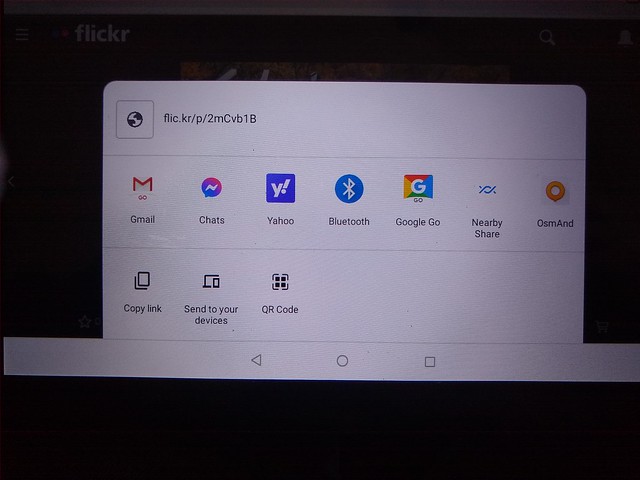
IMG_20211128_132143478 by Larry Alkire, on Flickr
 
The only way I have of posting pics is when using my laptop. The laptop is too big to take along on road trips and with some upcoming travel plans I want to be able to post pics occasionally.

And I also will not be trading in my worthless android tablet for a new Ipad just so I can post pictures.

Any suggestions will be appreciated.
 
I'm not familiar with that app but what I do know is that any image that can be defined by a https://www.whatever.jpeg (or similar image code) can be linked here.

Simply put brackets like
at the end.

Do this and the image will show up here in your post.
 
If it helps anyone help Larry with this issue, I updated the Imgur/Flickr post linked in my signature with a video of the process I used to get the BBCode from one of his Flicker images. Worked for me, but he’s not getting the choice of the BBCode, instead he’s getting the screenshot above.
 
I also do not get the bbcode option when i try to use the Flickr app from my phone but have no problems from the computer. You would think they’d figure it out by now but I just don’t worry about it
 
Can't be done with the App.
There used to be a couple third party apps that made it possible, but they appear to have vanished around 2018.
Only way I know to get the BBCode on a phone/tablet is through the web site on your browser.
Never been a problem for me, as I always travel with a laptop.
 
Larry, if you have the app on your tablet, try deleting it and just use your browser to access Flickr. I suspect, even if you start on your browser, when you click on the image, your tablet is opening the app.
 
Just to clarify, (back at my laptop).

I opened the browser on my android phone.
Did a google search on Flickr, and clicked the link to the main page.
Logged in, and picked a photo.
But the little arrow, gave me the same stuff Larry got.

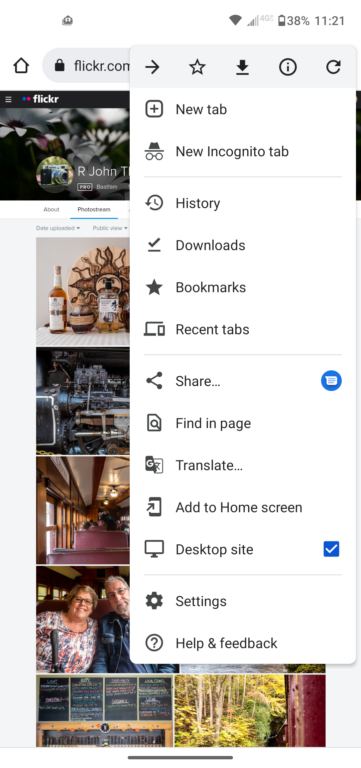
Clicked the three dots at the upper right of the page, for the drop down menu.
Click on "Desktop Site"
Now when I clicked on the arrow, I got the BBCode option.
Copy and past just like normal.

I did not remove the Flickr app to do this.
 
Last edited:
Aha. Bob’ got it!
the Mobile site (that’s more phone viewing friendly), does not give you the BBCode.
 
Larry, if you have the app on your tablet, try deleting it and just use your browser to access Flickr. I suspect, even if you start on your browser, when you click on the image, your tablet is opening the app.

Exactly. On my Droid tablet I can't post BBCode with app but if I go to the normal website I can get the BBCode in the normal way. On my phone it always defaults to the app a d can't get the BBCode from there. I didn't delete the app and have 2 shortcuts my home screen. Mine's Samsung and this many vary depending make and model. Either way like Bob suggested you have to get to the desktop site.
 
Exactly. On my Droid tablet I can't post BBCode with app but if I go to the normal website I can get the BBCode in the normal way. On my phone it always defaults to the app a d can't get the BBCode from there. I didn't delete the app and have 2 shortcuts my home screen. Mine's Samsung and this many vary depending make and model. Either way like Bob suggested you have to get to the desktop site.
So there are two different mobile apps for Flickr. One is the Flickr app, downloaded through the play store or something, and a mobile browser version.
The app opens the app, which you cannot get the BBCode. But if I open my browser (Google) and go to flickr.com, I get a different mobile version.
The browser mobile web page, has a desktop site option (see below) under the three dots to the upper right. After you click it, you get the normal web site.

From my Motorola android phone:
 
Well! It looks like different make devices behave differently, even within the same manufacturer. My phone and tablet are fairly current Samsung running the latest code and with the Google browser I get a truncated options menu with minimal options and without the option for the desktop browser Bob shows so no way to get to BBCode on the phone. On the tablet with Google I do get the same options as he shows however on the tablet I can go directly to the desktop browser via a home screen shortcut I created to take me there. No wonder these devices can drive a person to the nut house. LOL.
 
Bob,
I added your screenshot to the thread I have linked in my signature about using Imgur/Flickr. It's become quite the article. Someday, maybe I'll have all the tips and tricks in one place. Thanks for your contribution. Maybe someone (dpep?) Could copy and paste post # 6 of that thread into it's own Sticky Article?
 
Thanks for all your help guys, but I have come to the conclusion that I am just too fvcking stoopid to do this any other way than using my laptop.


Maybe some day it will "click" for me and I will figure it out.
 
Well what do you know, I finally got it.

I retract the comment about being too stoopid. (and no, that's not up for debate)........
 
I re-read Bob's post #9 where he mentioned getting the bbcode then just copy and paste.

I could highlight the code but then couldn't figure out how to get the copy prompt to come up. It was quite slow but I was able to click on copy, then opened the forum tab and was able to see the code just waiting to be pasted.

Another new trick taught to an old dog.
 
Last edited:
Back
Top